Firmware Usage - IPC Streaming

Buildroot only. Other firmware
has no web page and no default streaming!
Downloading the Filesystem
Firmware here: Buildroot
File shared via Netdisk:
Link: https://pan.baidu.com/s/1NyfRuSKcakxMJCZohiFl6A?pwd=fanc Extraction code: fanc Copy this content and open the Baidu Netdisk mobile app for easier operation
--Shared by Baidu Netdisk Super Member v6
After extracting: RV1126_RV1109_AI_Camera_V1.1.4_20240907_imx307_imx415.img
Basic Configuration / Network Configuration
Checking the IP Address via ADB
After the device
roy@HUAWEIMagicMiniM4-7 ~ % adb devices
List of devices attached
fec3d3812d367ee	device

adb shell
Checking the IP address inside the device: eth0 10.0.1.222
root@rv1126_rv1109:/# ip addr
1: lo: <LOOPBACK,UP,LOWER_UP> mtu 65536 qdisc noqueue qlen 1000
    link/loopback 00:00:00:00:00:00 brd 00:00:00:00:00:00
    inet 127.0.0.1/8 scope host lo
       valid_lft forever preferred_lft forever
2: eth0: <BROADCAST,MULTICAST,UP,LOWER_UP> mtu 1500 qdisc mq qlen 1000
    link/ether 62:c6:19:eb:91:a5 brd ff:ff:ff:ff:ff:ff
    inet 10.0.0.254/24 brd 10.0.0.255 scope global eth0
       valid_lft forever preferred_lft forever
Changing the Network IP Address
-
For the
imx307camera, modify the/oem/usr/share/rkipc-imx307.iniconfiguration file -
For the
imx415camera, modify the/oem/usr/share/rkipc-imx415.iniconfiguration file -
If
no camera is present, modify the/oem/usr/share/rkipc-common.iniconfiguration file
Taking
root@rv1126_rv1109:/# vi /oem/usr/share/rkipc-imx415.ini
Default static configuration
Change it to
method=dhcpfor dynamic acquisition
...
[network.eth]
enable = 1
interface_num=1
ndevice_name=eth0
method=static
device_ip=10.0.0.254
subnetMask=255.255.255.0
gateway=10.0.0.1
DNS1=10.0.0.1
DNS2=114.114.114.114
Change it to dynamic acquisition:
...
[network.eth]
enable = 1
interface_num=1
ndevice_name=eth0
method=dhcp
# ... delete the following
After changing it, obtain a dynamic DHCP address again
root@rv1126_rv1109:/# dhcpcd eth0
Checking the IP address inside the device: eth0 10.0.0.125
root@rv1126_rv1109:/# ip addr
1: lo: <LOOPBACK,UP,LOWER_UP> mtu 65536 qdisc noqueue qlen 1000
    link/loopback 00:00:00:00:00:00 brd 00:00:00:00:00:00
    inet 127.0.0.1/8 scope host lo
       valid_lft forever preferred_lft forever
2: eth0: <BROADCAST,MULTICAST,UP,LOWER_UP> mtu 1500 qdisc mq qlen 1000
    link/ether 62:c6:19:eb:91:a5 brd ff:ff:ff:ff:ff:ff
    inet 10.0.0.254/24 brd 10.0.0.255 scope global eth0
       valid_lft forever preferred_lft forever
    inet 10.0.0.125/22 brd 10.0.3.255 scope global dynamic noprefixroute eth0
       valid_lft 4057sec preferred_lft 3545sec
10.0.0.254 IP address, just reboot:root@rv1126_rv1109:/# reboot
After rebooting
root@rv1126_rv1109:/# ip addr
1: lo: <LOOPBACK,UP,LOWER_UP> mtu 65536 qdisc noqueue qlen 1000
    link/loopback 00:00:00:00:00:00 brd 00:00:00:00:00:00
    inet 127.0.0.1/8 scope host lo
       valid_lft forever preferred_lft forever
2: eth0: <BROADCAST,MULTICAST,UP,LOWER_UP> mtu 1500 qdisc mq qlen 1000
    link/ether 62:c6:19:eb:91:a5 brd ff:ff:ff:ff:ff:ff
    inet 10.0.0.125/22 brd 10.0.3.255 scope global dynamic noprefixroute eth0
       valid_lft 4057sec preferred_lft 3545sec
Basic Usage
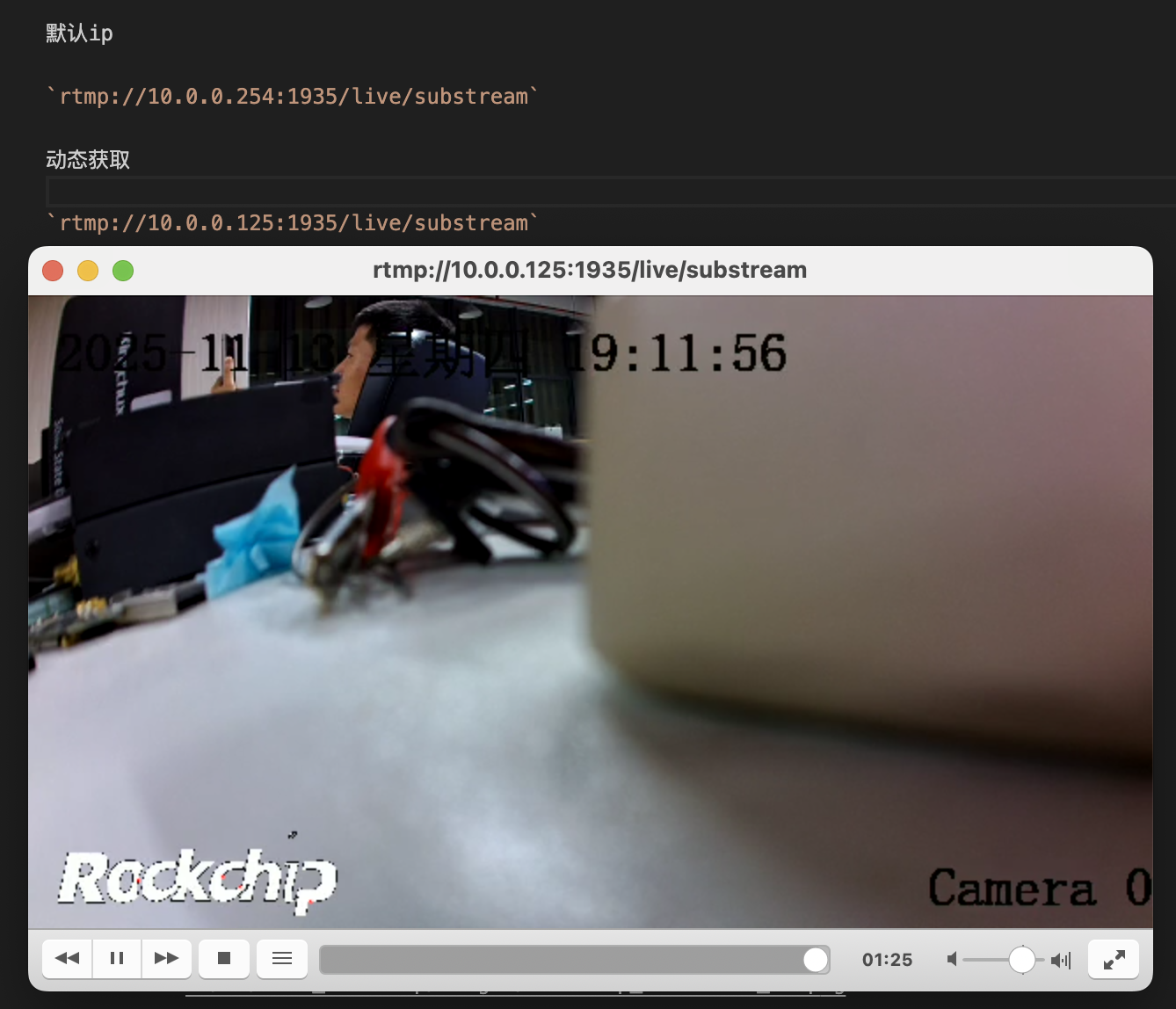
Viewing the Stream
Via the default IP
rtsp://10.0.0.254:1935/live/substream
Via the dynamic IP obtained in the previous steps
rtsp://10.0.0.125:1935/live/substream
Note: the IP has been changed to
dynamic acquisition. The default streaming port of theBuildrootfirmware is1935Please check the IP via the
adb commandor therouter device list; it is no longer explained separately!
Stopping the Stream
If you need to run another program that uses the camera, stop it first:
/etc/init.d/S98_lunch_init stop
Web Page Content
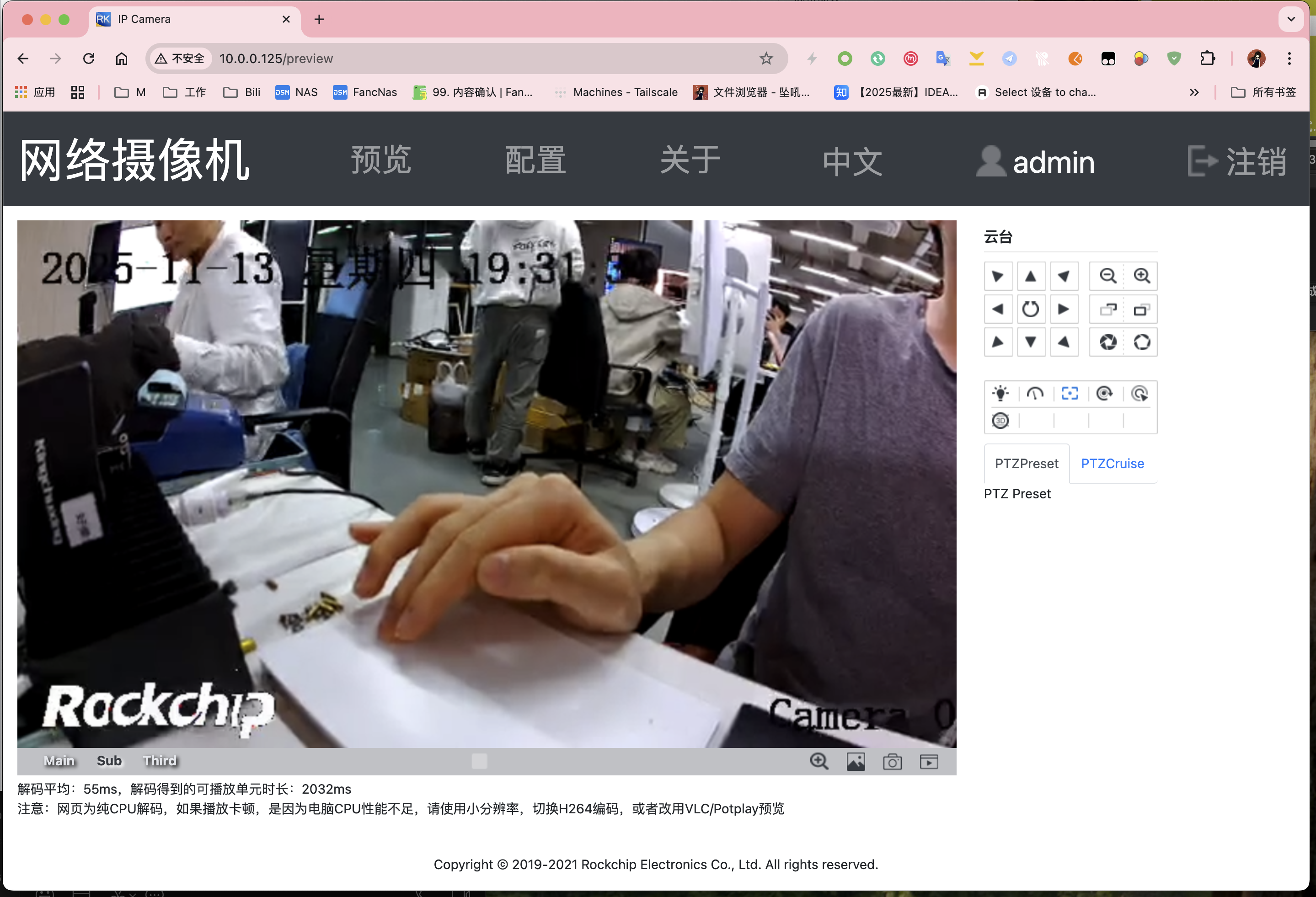
Open IP 10.0.0.125 directly in the browser
Via the dynamic IP obtained in the previous steps
Video latency! Special note!
Please refer to FAQ - Video latency! Special note!
Troubleshooting Common Issues
Streaming Abnormalities
- Usually the camera is not inserted, or is not recognized correctly
After running adb shell, logcat | grep imx415 or logcat | grep imx307 to view the driver loading information of the corresponding imx series camera
If logcag is not available, use dmesg | grep imx415 or dmesg | grep imx307
If there is no loading information, it means there is no camera or it is not recognized properly. Reference information:
root@rv1126bp-buildroot:/# logcat | grep imx
...
Jan  1 00:00:01 rv1126bp-buildroot kern.info kernel: [    1.157751] imx307 1-001a: driver version: 00.01.06
Jan  1 00:00:01 rv1126bp-buildroot kern.info kernel: [    1.366783] imx415 1-0010: driver version: 00.01.08
No Router
Some student users have no router, only Wi-Fi. You can share the network as follows,
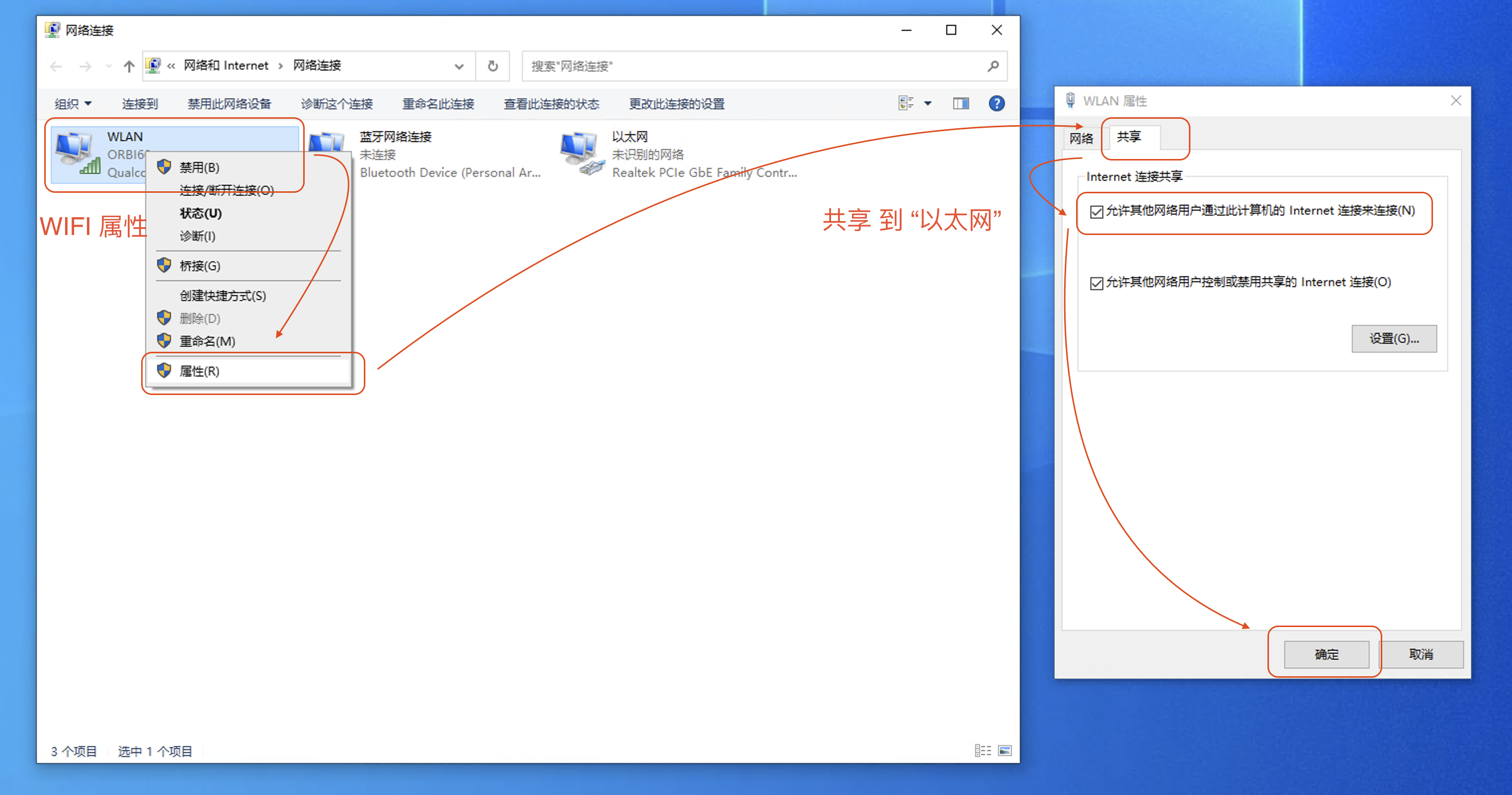
- First open
Adapter Settingsin the control panel
Control Panel - Network Connections - Change adapter settings
- Enable sharing
WLAN - Right-click - Properties - Sharing - Allow other network users to connect through this computer's Internet connection(N) - OK
- Check that it is enabled successfully;
Ethernetis automatically switched to theshared subnet
Ethernet - Status - Details - 192.168.137.1
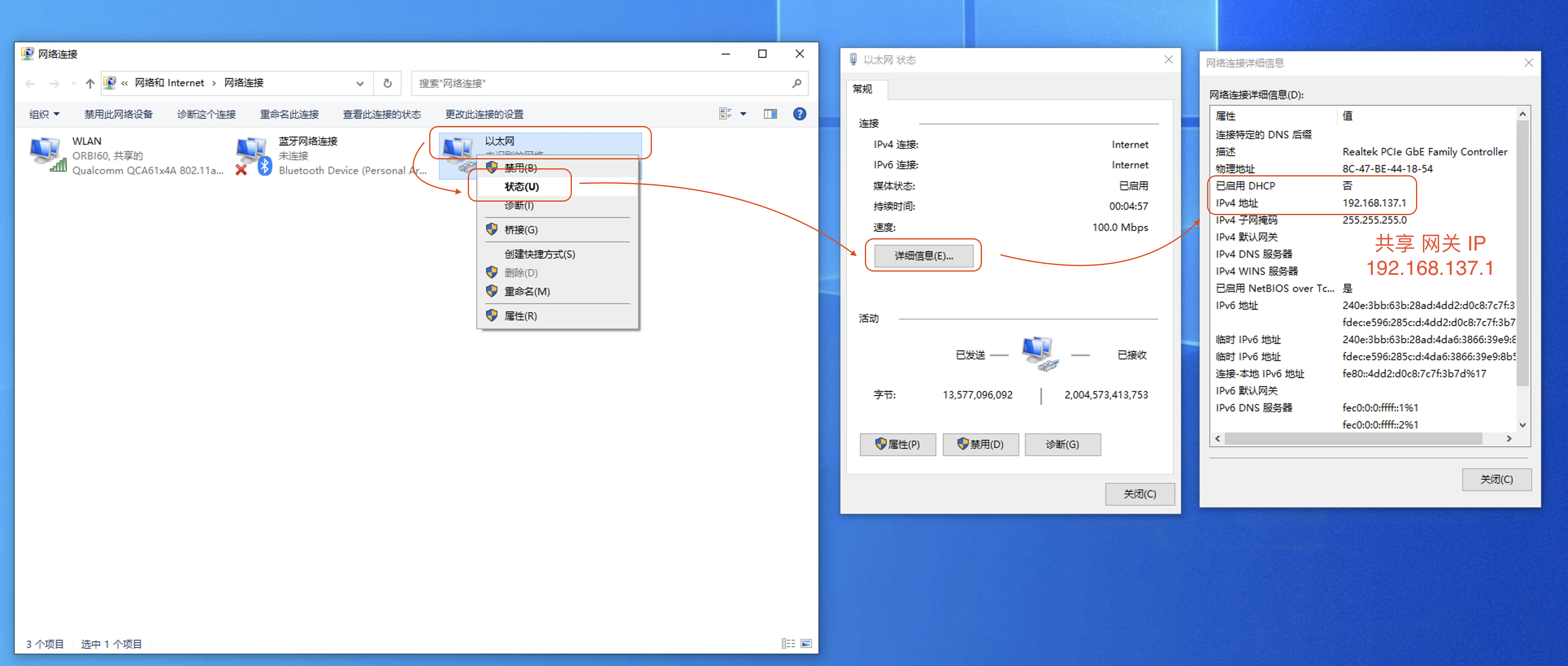
- Finally, connect the computer's
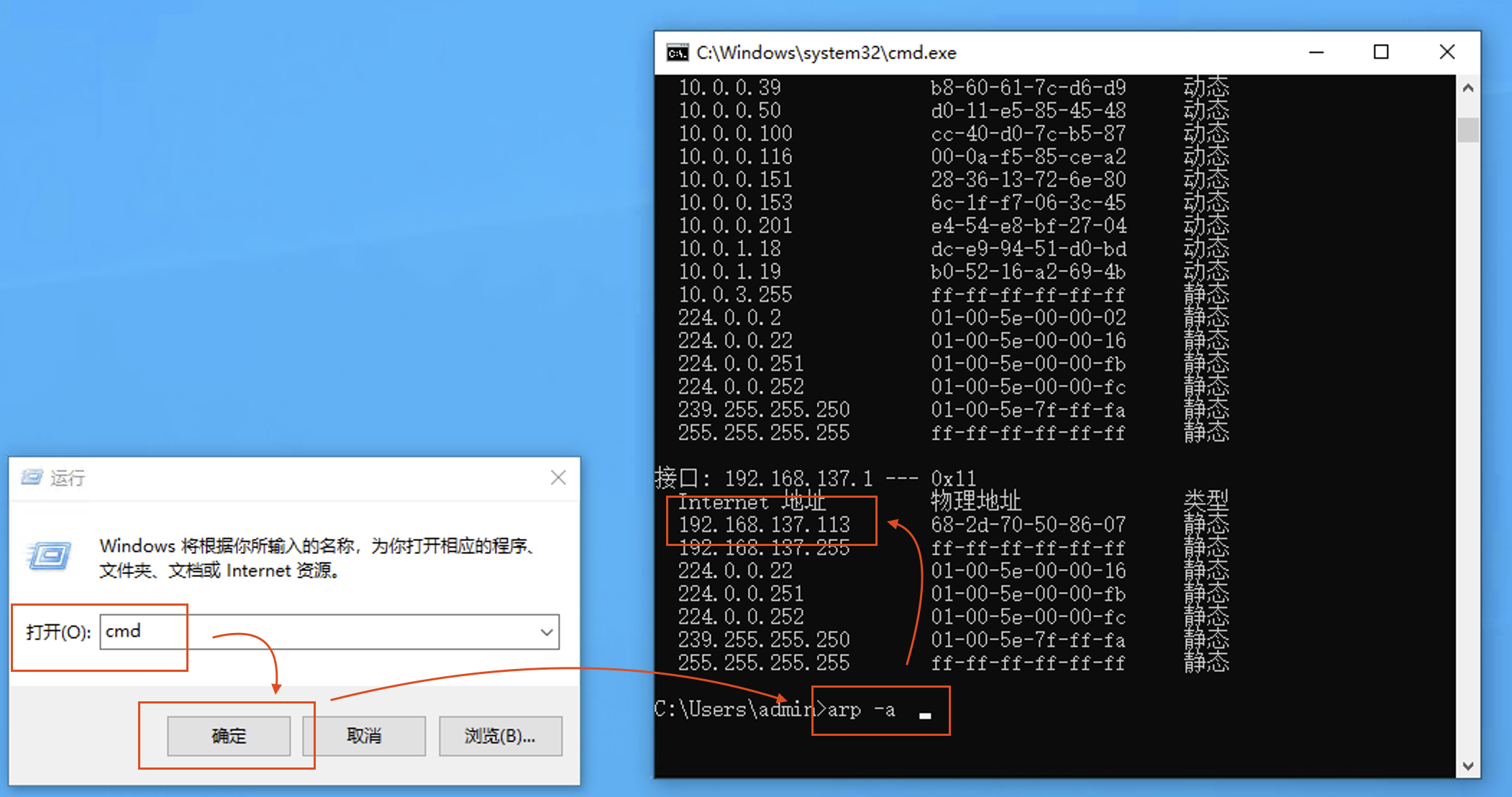
Ethernetto the device and find the device's shared IP througharp
It is usually 192.168.137.x
Exclude 192.168.137.1 (
Ethernet gateway )Exclude 192.168.137.255 (
broadcast address )
Win + R cmd
arp -a

Interface: 192.168.137.1 --- 0x11
  Internet Address      Physical Address      Type
  192.168.137.113       68-2d-70-50-86-07     static
  192.168.137.255       ff-ff-ff-ff-ff-ff     static