Application Test - Yolov5

Deploy Rockchip's official
rknn_model_zooyolov5yourselfCross-compilation toolchain:
RV1126 Link: https://pan.baidu.com/s/1RZC4oGlDzX6iyWIBd9zkoQ?pwd=btgt Extraction code: btgt Copy this content and open the Baidu Netdisk mobile app for easier operation
Prebuilt Files and Models
https://wiki.fanconn.com/api_file/RV1126/02.软件资料/RV1126_RV1126B-p_YoloV5_Test.zip
1. Preparing the Build Environment
1.1 Computer Hardware Configuration
Reference hardware configuration for the Ubuntu development environment computer:
| Hardware | Information |
|---|---|
| CPU | 64-bit, 4 cores ⬆️ |
| System | Ubuntu Server 24.04.3 LTS | |
| Memory | 8GB ⬆️ |
| Storage | 64GB ⬆️ free |
| User | A normal user; |
1.2 Computer Software Configuration
| Item | Configuration |
|---|---|
| OS used | Ubuntu Server 24.04.3 LTS |
| Board chip | RV1126 |
| SDK | rv1126-repo-v20230717-dev.tar.gz (prebuilts directory already included) |
| Cross-compilation environment | rv1126-repo-v20230717-dev_prebuilts.zip prebuilts does not need to be downloaded separately |
sudo apt update
sudo apt install git unzip vim
sudo apt install -y git cmake build-essential

## Ubuntu 24 server (minimized) is missing this
sudo apt update
sudo apt install -y libgl1
sudo apt install -y libsm6 libxext6 libxrender1
sudo apt install -y libglib2.0-0 libgomp1
1.3 Installing Python 3.8
It is recommended to use the PPA (Personal Package Archives) repository to install it:
-
Add the PPA repository:
sudo add-apt-repository ppa:deadsnakes/ppaPress
Enterto continue -
Update the package list:
sudo apt update -
Install Python 3.8:
sudo apt install python3.8
sudo apt install python3.8-venv
sudo apt install python3.8-dev build-essential -
Verify the installation:
python3.8 --versionDisplaying
Python 3.8.xmeans the installation succeeded
1.3 Creating a Virtual Environment
# Create the venv_1126 virtual environment
python3.8 -m venv venv_1126
source venv_1126/bin/activate

## Upgrade pip inside the virtual environment
pip install --upgrade pip
2. Preparing the Software Environment
2.0 Activate the Virtual Environment Before Proceeding
- Activate the virtual environment:
cd ~
source venv_1126/bin/activate
2.1 Preparing the Environment Conversion Software
Download here: https://github.com/rockchip-linux/rknn-toolkit/releases
- Install rknn-toolkit v1.75 in the environment:
cd ~
mkdir ~/rknn-toolkit-v1.75
cd ~/rknn-toolkit-v1.75
wget https://github.com/rockchip-linux/rknn-toolkit/releases/download/v1.7.5/rknn-toolkit-v1.7.5-packages.tar.gz

# Extract
tar -zxvf rknn-toolkit-v1.7.5-packages.tar.gz
Copy an ubuntu22 file, rename it to ubuntu24 and use it
cp packages/requirements-cpu-ubuntu20.04_py38.txt packages/requirements-cpu-ubuntu24.04_py38.txt
The content versions are as follows: vim packages/requirements-cpu-ubuntu24.04_py38.txt
tensorflow==2.2.0
torch==1.6.0
torchvision==0.7.0
mxnet==1.5.0
# Uninstall a possible old environment
# pip uninstall protobuf onnx

# Install rknn_toolkit-v1.7.5
pip install -r packages/requirements-cpu-ubuntu24.04_py38.txt
pip install packages/rknn_toolkit-1.7.5-cp38-cp38-linux_x86_64.whl
- Prepare the rknn_model_zoo environment
cd ~
git clone https://github.com/airockchip/rknn_model_zoo.git
3. Converting the Model
3.1 Obtaining and Converting the Model
-
Download the model:
cd ~/rknn_model_zoo/examples/yolov5/model/
wget https://ftrg.zbox.filez.com/v2/delivery/data/95f00b0fc900458ba134f8b180b3f7a1/examples/yolov5/yolov5n.onnx -
Convert the model:
cd ~/rknn_model_zoo/examples/yolov5/python/
python3 convert.py ../model/yolov5n.onnx rv1126 u8 ../model/yolov5n_rv1126.rknn
Model download:
The list of example models provided by rknn_model_zoo is in the readme on the home page: https://github.com/airockchip/rknn_model_zoo
Current test model yolov5n: https://ftrg.zbox.filez.com/v2/delivery/data/95f00b0fc900458ba134f8b180b3f7a1/examples/yolov5/yolov5n.onnx
3.2 Conversion Result
Conversion process:
(venv_1126) roy@Debian-i7-7700:~/rknn_model_zoo/examples/yolov5/python$ python3 convert.py ../model/yolov5n.onnx rv1126 u8 ../model/yolov5n_rv1126.rknn
W rknn-toolkit version: 1.7.5
--> Config model
done
--> Loading model
W Catch exception when optimize onnx model, skip it! Exception: Unresolved value references: /model.11/Constant_1_output_0,/model.11/Constant_output_0,/model.15/Constant_1_output_0,/model.15/Constant_output_0,
/home/roy/venv_1126/lib/python3.8/site-packages/rknn/api/rknn.py:160: FutureWarning: Possible nested set at position 7
  ret = self.rknn_base.load_onnx(model, inputs, input_size_list, outputs)
done
--> Building model
W found outlier value, this may affect quantization accuracy
const name                                   abs_mean    abs_std     outlier value
Conv_/model.0/conv/conv/Conv_194:weight      0.68        0.89        -11.603
W:tensorflow:From /home/roy/venv_1126/lib/python3.8/site-packages/tensorflow/python/framework/func_graph.py:981: py_func (from tensorflow.python.ops.script_ops) is deprecated and will be removed in a future version.
Instructions for updating:
tf.py_func is deprecated in TF V2. Instead, there are two
    options available in V2.
    - tf.py_function takes a python function which manipulates tf eager
    tensors instead of numpy arrays. It's easy to convert a tf eager tensor to
    an ndarray (just call tensor.numpy()) but having access to eager tensors
    means `tf.py_function`s can use accelerators such as GPUs as well as
    being differentiable using a gradient tape.
    - tf.numpy_function maintains the semantics of the deprecated tf.py_func
    (it is not differentiable, and manipulates numpy arrays). It drops the
    stateful argument making all functions stateful.

W:tensorflow:From /home/roy/venv_1126/lib/python3.8/site-packages/tensorflow/python/ops/resource_variable_ops.py:1659: calling BaseResourceVariable.__init__ (from tensorflow.python.ops.resource_variable_ops) with constraint is deprecated and will be removed in a future version.
Instructions for updating:
If using Keras pass *_constraint arguments to layers.

done
--> Export rknn model
done

(venv_1126) roy@Debian-i7-7700:~/rknn_model_zoo/examples/yolov5/python$ ls ../model/
anchors_yolov5.txt  bus.jpg  coco_80_labels_list.txt  download_model.sh  yolov5n.onnx  yolov5n_rv1126.rknn
The converted files are located in: ~/rknn_model_zoo/examples/yolov5/model/
Files included:
yolov5n.onnx- the original ONNX modelyolov5n_rv1126.rknn- the converted RKNN modelanchors_yolov5.txt- the anchor filecoco_80_labels_list.txt- the label filebus.jpg- the test imagedownload_model.sh- the example provides ayolov5s_relu.onnxthat you can try yourself
4. Cross-Compiling YOLOV5
4.0 Activate the Virtual Environment Before Proceeding
- Activate the virtual environment:
cd ~
source venv_1126/bin/activate
4.1 Preparing the Cross-Compilation Toolchain
If you have already downloaded the SDK
Just use the prebuilts directory directly
Download the cross-compilation toolchain:
For the download address, see 1.2 Computer Software Configuration
-
Download and extract the cross-compilation environment:
cd ~
unzip rv1126-repo-v20230717-dev_prebuilts.zip -
Get the cross-compilation tool path:
RV1126 is
arm; get the path of the corresponding environment belowcd prebuilts/gcc/linux-x86/arm/gcc-arm-8.3-2019.03-x86_64-arm-linux-gnueabihf/bin
(venv_1126) roy@Debian-i7-7700:~/prebuilts/gcc/linux-x86/arm/gcc-arm-8.3-2019.03-x86_64-arm-linux-gnueabihf/bin$ pwd
/home/roy/prebuilts/gcc/linux-x86/arm/gcc-arm-8.3-2019.03-x86_64-arm-linux-gnueabihf/binOutput path:
/home/roy/prebuilts/gcc/linux-x86/arm/gcc-arm-8.3-2019.03-x86_64-arm-linux-gnueabihf/bin
4.2 Cross-Compiling yolov5
-
Set the environment variables:
export PATH=~/prebuilts/gcc/linux-x86/arm/gcc-arm-8.3-2019.03-x86_64-arm-linux-gnueabihf/bin:$PATH
export GCC_COMPILER=~/prebuilts/gcc/linux-x86/arm/gcc-arm-8.3-2019.03-x86_64-arm-linux-gnueabihf/bin/arm-linux-gnueabihf -
Start compiling:
cd ~/rknn_model_zoo
chmod +x build-linux.sh
./build-linux.sh -t rv1126 -a armhf -d yolov5 -
Build output: The program is located at
~/rknn_model_zoo/install/rv1126_linux_armhf/rknn_yolov5_demo
4.3 Build Result
(venv_1126) roy@Debian-i7-7700:~/rknn_model_zoo$ ./build-linux.sh -t rv1126 -a armhf -d yolov5

./build-linux.sh -t rv1126 -a armhf -d yolov5
/home/roy/prebuilts/gcc/linux-x86/arm/gcc-arm-8.3-2019.03-x86_64-arm-linux-gnueabihf/bin/arm-linux-gnueabihf
===================================
BUILD_DEMO_NAME=yolov5
BUILD_DEMO_PATH=examples/yolov5/cpp
TARGET_SOC=rv1126
TARGET_ARCH=armhf
BUILD_TYPE=Release
ENABLE_ASAN=OFF
DISABLE_RGA=OFF
DISABLE_LIBJPEG=OFF
INSTALL_DIR=/home/roy/rknn_model_zoo/install/rv1126_linux_armhf/rknn_yolov5_demo
BUILD_DIR=/home/roy/rknn_model_zoo/build/build_rknn_yolov5_demo_rv1126_linux_armhf_Release
CC=/home/roy/prebuilts/gcc/linux-x86/arm/gcc-arm-8.3-2019.03-x86_64-arm-linux-gnueabihf/bin/arm-linux-gnueabihf-gcc
CXX=/home/roy/prebuilts/gcc/linux-x86/arm/gcc-arm-8.3-2019.03-x86_64-arm-linux-gnueabihf/bin/arm-linux-gnueabihf-g++
===================================
-- Configuring done (0.0s)
-- Generating done (0.0s)
-- Build files have been written to: /home/roy/rknn_model_zoo/build/build_rknn_yolov5_demo_rv1126_linux_armhf_Release
[ 50%] Built target imageutils
[ 50%] Built target imagedrawing
[ 50%] Built target fileutils
[ 66%] Built target audioutils
[100%] Built target rknn_yolov5_demo
[ 16%] Built target imageutils
[ 33%] Built target fileutils
[ 50%] Built target imagedrawing
[ 83%] Built target rknn_yolov5_demo
[100%] Built target audioutils
Install the project...
-- Install configuration: "Release"
-- Installing: /home/roy/rknn_model_zoo/install/rv1126_linux_armhf/rknn_yolov5_demo/./rknn_yolov5_demo
-- Set non-toolchain portion of runtime path of "/home/roy/rknn_model_zoo/install/rv1126_linux_armhf/rknn_yolov5_demo/./rknn_yolov5_demo" to "$ORIGIN/lib"
-- Installing: /home/roy/rknn_model_zoo/install/rv1126_linux_armhf/rknn_yolov5_demo/./model/bus.jpg
-- Installing: /home/roy/rknn_model_zoo/install/rv1126_linux_armhf/rknn_yolov5_demo/./model/coco_80_labels_list.txt
-- Installing: /home/roy/rknn_model_zoo/install/rv1126_linux_armhf/rknn_yolov5_demo/model/yolov5n_rv1126.rknn
-- Installing: /home/roy/rknn_model_zoo/install/rv1126_linux_armhf/rknn_yolov5_demo/model/yolov5n_rv1126b.rknn
-- Installing: /home/roy/rknn_model_zoo/install/rv1126_linux_armhf/rknn_yolov5_demo/lib/librknn_api.so
-- Installing: /home/roy/rknn_model_zoo/install/rv1126_linux_armhf/rknn_yolov5_demo/lib/librga.so
5. Verifying on the CAM126 Device
5.1 Deploying the Files
-
Copy the model to the program directory:
Prepare a CAM126 board with the
firmware already flashed and power it on -
Copy the model to the program directory:
If
yolov5n_rv1126.rknnis missing from rknn_yolov5_demo, you can copy one manually
cp ~/rknn_model_zoo/examples/yolov5/model/yolov5n_rv1126.rknn ~/rknn_model_zoo/install/rv1126_linux_armhf/rknn_yolov5_demo/model/
-
Install the ADB tool:
sudo apt install google-android-platform-tools-installer -
Connect the device and upload the program:
Wired connection: connect the USB data cable directly
roy@Debian-i7-7700:~$ adb devices
List of devices attached
fec3d3812d367ee	device

adb push ~/rknn_model_zoo/install/rv1126_linux_armhf/rknn_yolov5_demo/ /root/
Wireless connection: first obtain the device IP address, for example: 10.0.1.226
roy@Debian-i7-7700:~$ adb connect 10.0.1.226
connected to 10.0.1.226:5555

roy@Debian-i7-7700:~$ adb devices
List of devices attached
10.0.1.226:5555	device

adb push ~/rknn_model_zoo/install/rv1126_linux_armhf/rknn_yolov5_demo/ /root/
5.2 Running the Verification
- Enter the program directory:
First make sure the device is connected:
(venv_1126) roy@Debian-i7-7700:~$ adb devices
List of devices attached
10.0.1.226:5555	device

(venv_1126) roy@Debian-i7-7700:~$ adb shell
root@rv1126_rv1109:/#
root@rv1126_rv1109:~# ls /root/
rknn_yolov5_demo

root@rv1126_rv1109:~# cd /root/rknn_yolov5_demo/
root@rv1126_rv1109:/root/rknn_yolov5_demo# ls
lib  model  rknn_yolov5_demo
- Run the test program:
root@rv1126_rv1109:/root/rknn_yolov5_demo# ./rknn_yolov5_demo ./model/yolov5n_rv1126.rknn ./model/bus.jpg
5.3 Running Result
root@rv1126_rv1109:/root/rknn_yolov5_demo# ./rknn_yolov5_demo ./model/yolov5n_rv1126.rknn ./model/bus.jpg
load lable ./model/coco_80_labels_list.txt
librknn_runtime version 1.7.3 (2e55827 build: 2022-08-25 10:45:32 base: 1131)
model input num: 1, output num: 3
input tensors:
  index=0, name=images_209, n_dims=4, dims=[1, 3, 640, 640], n_elems=1228800, size=1228800, fmt=NCHW, type=UINT8, qnt_type=AFFINE, zp=0, scale=0.003922
output tensors:
  index=0, name=Sigmoid_/model.24/Sigmoid/out0_0, n_dims=4, dims=[1, 255, 80, 80], n_elems=1632000, size=1632000, fmt=NCHW, type=UINT8, qnt_type=AFFINE, zp=0, scale=0.003917
  index=1, name=Sigmoid_/model.24/Sigmoid_1/out0_1, n_dims=4, dims=[1, 255, 40, 40], n_elems=408000, size=408000, fmt=NCHW, type=UINT8, qnt_type=AFFINE, zp=0, scale=0.003918
  index=2, name=Sigmoid_/model.24/Sigmoid_2/out0_2, n_dims=4, dims=[1, 255, 20, 20], n_elems=102000, size=102000, fmt=NCHW, type=UINT8, qnt_type=AFFINE, zp=0, scale=0.003920
model is NCHW input fmt
model input height=640, width=640, channel=3
origin size=640x640 crop size=640x640
input image: 640 x 640, subsampling: 4:2:0, colorspace: YCbCr, orientation: 1
scale=1.000000 dst_box=(0 0 639 639) allow_slight_change=1 _left_offset=0 _top_offset=0 padding_w=0 padding_h=0
librga fail to get driver version! Compatibility mode will be enabled.

rga_api version 1.10.1_[0]
rknn_run
person @ (108 235 203 523) 0.855
person @ (209 246 288 506) 0.830
person @ (483 223 568 510) 0.510
bus @ (122 158 557 451) 0.476
write_image path: out.png width=640 height=640 channel=3 data=0xa5347008
Final output: File information:
root@rv1126-buildroot:~/rknn_yolov5_demo# ls
lib               model             out.png           rknn_yolov5_demo
Result images:
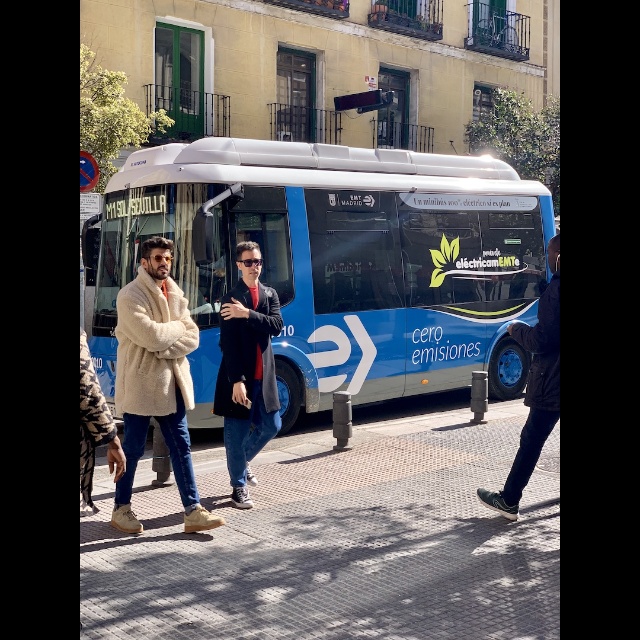
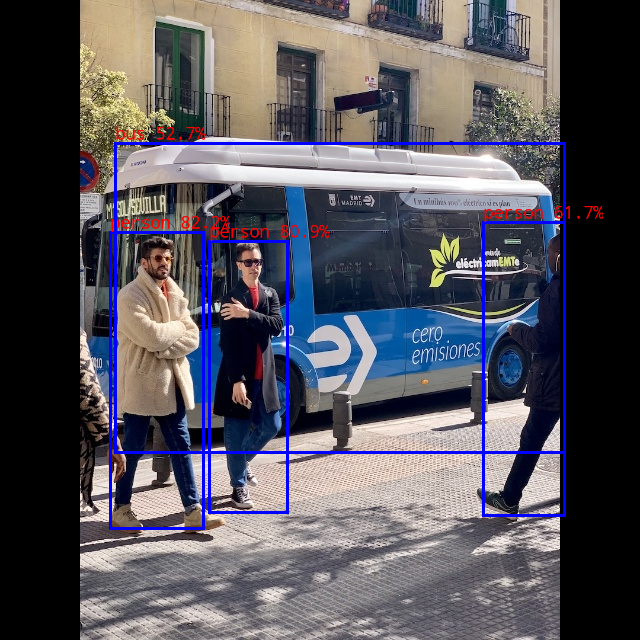
Summary
Through the above steps, we successfully completed:
- ✅ Setting up the cross-compilation environment
- ✅ Converting the Yolov5 model to RKNN format
- ✅ Compiling the RKNN Yolov5 demo program
- ✅ Deploying and verifying on the CAM126 device
Notes
| Item | CAM126B-P | RV1126 | Description |
|---|---|---|---|
| RKNN Toolkit version | rknn-toolkit2 v2.x | rknn-toolkit v1.7.5 | The two are incompatible and cannot be mixed |
| System architecture | 64-bit ARM (aarch64) | 32-bit ARM (armhf) | The corresponding cross-compilation toolchain is required |
| Build options | -t rv1126b -a aarch64 | -t rv1126 -a armhf | The build script parameters differ |
| Deployment method | Direct file deployment | Direct file deployment | Difference in how it is run |
| Model conversion warnings | May occur, usually does not affect use | May occur, usually does not affect use | Quantization accuracy warnings that can be ignored |
| Python environment | Python 3.8 + virtual environment | Python 3.8 + virtual environment | Ensure environment consistency |