Quick Install - MAC

GT500 Installation
Quickly get started with the GT500 5G Dongle on macOS
Prerequisites
- A Mac device
- Dongle GT500 and a Type-C data cable
- A Nano-SIM card with Internet service
Installing the Nano-SIM Card
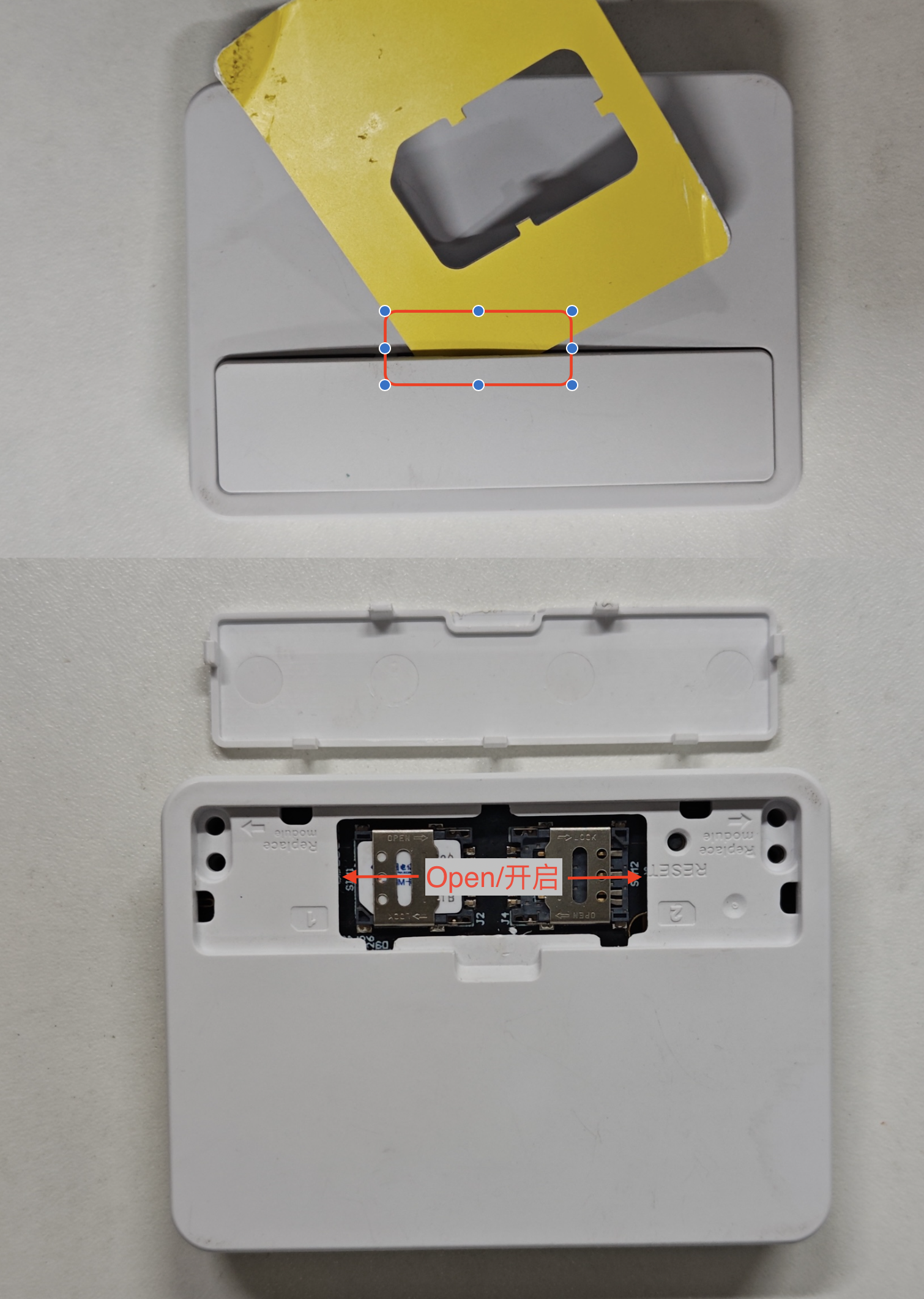
- Find a plastic card and pry the cover open
- Gently pull out the SIM1 card holder, insert the Nano-SIM card, and push it back in place
Connecting to the Mac
There is currently no serial driver for Mac computers, so the switch to ECM mode can only be done from Linux; please use Linux to switch it
AT+QCFG="usbnet",1: ECM mode (recommended for Linux systems)
Quick Configuration
macOS has no serial driver, so AT commands cannot be sent from the Mac itself. Run the table below on Linux or Windows, then plug the Dongle back into the Mac.
Recommended order
| Platform | Commands to run |
|---|---|
| Linux / Mac / Android | 1 → 2 → 4 (disable hot-swap → check mode → switch to ECM) |
| Windows | 1 → 2 → 3 (disable hot-swap → check mode → switch to RNDIS) |
| Dual-SIM models | Use 6 (SIM1) or 7 (SIM2), then confirm +CPIN: READY |
| Changes not taking effect | Run 8 AT+CFUN=1,1 to reboot the module |
Every command below was tested on a RM520N-GL (firmware
RM520NGLAAR03A04M4G, China Telecom 5G) and must be run on Linux (minicom -D /dev/ttyUSB2 -b 115200) or Windows (QCOM).
| No. | Command | Notes | Measured response |
|---|---|---|---|
| 1 | AT+QSIMDET=0,0 | Disable SIM hot-swap detection; the first parameter 0 means off | OK, reads back +QSIMDET: 0,0 |
| 2 | AT+QCFG="usbnet" | Query the current USB mode (1=ECM, 0=RNDIS) | +QCFG: "usbnet",1 |
| 3 | AT+QCFG="usbnet",0 | Switch to Windows mode (RNDIS); not recommended on Mac | OK, reads back +QCFG: "usbnet",0 |
| 4 | AT+QCFG="usbnet",1 | Switch to Linux / Mac mode (ECM); takes effect after AT+CFUN=1,1 | OK, reads back +QCFG: "usbnet",1 |
| 5 | AT+CPIN? | Check the SIM; +CME ERROR: 10 = no card, SIM PIN = PIN locked | +CPIN: READY |
| 6 | AT+QUIMSLOT=1 | Switch to SIM1; re-reads the card in about 3~5 s | OK, then +CPIN: READY |
| 7 | AT+QUIMSLOT=2 | Switch to SIM2; CPIN: NOT READY when that slot is empty | OK, reads back +QUIMSLOT: 2 |
| 8 | AT+CFUN=1,1 | Reboot the module; USB re-enumerates after ~40 s | OK, then the module disappears from USB and returns; no serial data in between |
| 9 | AT&F | Factory reset (AT command defaults only, NV settings untouched) | OK; usbnet stays 1, QUIMSLOT stays 1, CGDCONT is not cleared; a few seconds of garbage / ERROR echoes afterwards |
| 10 | ATI | Model and firmware revision | Quectel / RM520N-GL / Revision: RM520NGLAAR03A04M4G |
| 11 | AT+GMR | Firmware revision | RM520NGLAAR03A04M4G |
| 12 | AT+CGSN | IMEI (15 digits on the real unit; middle 4 masked) | 86854906****457 |
| 13 | AT+QUIMSLOT? | Current SIM slot | +QUIMSLOT: 1 |
| 14 | AT+QSIMDET? | Hot-swap detection switch | +QSIMDET: 0,0 |
| 15 | AT+CSQ | Meaningless on 5G; use AT+QCSQ instead | +CSQ: 99,99 |
| 16 | AT+QCSQ | 5G returns RSRP / RSRQ / SINR | +QCSQ: "NR5G",-81,32,-10 (floats between -80 and -81 dBm) |
| 17 | AT+CEREG? | Registration status; 5G SA may return 0,0 while fully online | +CEREG: 0,0 (still able to access the Internet) |
| 18 | AT+COPS? | Current operator | +COPS: 0,0,"CHN-CT",11 |
| 19 | AT+QNWINFO | RAT / band / EARFCN | +QNWINFO: "TDD NR5G","46011","NR5G BAND 78",620640 |
| 20 | AT+QENG="servingcell" | Serving cell; cellID / TAC tail masked | +QENG: "servingcell","NOCONN","NR5G-SA","TDD",460,11,75A0CB***,390,752A**,620640,78,12,-81,-10,32,1,- |
| 21 | AT+CGDCONT? | Current APN profiles | 4 lines: ctnet(1) / IMS(2) / ctwap(3) / sos(4), all IPV4V6 |
| 22 | AT+IPR? | AT port baud rate | +IPR: 115200 |
| 23 | AT+CFUN=0 / AT+CFUN=1 | RF off / on; quick way to reload configuration | OK (no extra output) |
IMEI, cellID and TAC are values from the real unit with sensitive digits masked; signal figures vary with location and weather.
AT&F does not reset usbnet / QUIMSLOT / APN on this firmware (it only restores AT command defaults), and the Mac still sees the RM520N-GL adapter afterwards. Other firmware versions may behave differently, so re-check AT+QCFG="usbnet" and AT+QUIMSLOT? after a factory reset.
Configuring the Dongle - Mac Side
The factory default is already ECM (
usbnet=1), so the Dongle usually works as soon as it is plugged into a Mac; step 1 below is only needed if the mode was changed.
1. Confirm / switch to ECM on Linux
See Quick Install - Linux; serial parameters 115200 8N1:
root@OpenWrt:~# minicom -D /dev/ttyUSB2 -b 115200
Check the current mode:
AT+QCFG="usbnet"
+QCFG: "usbnet",1

OK
1 means ECM, no change needed. Otherwise switch and reboot the module:
AT+QCFG="usbnet",1
OK

AT+CFUN=1,1
After the reboot the module re-enumerates as a CDC-ECM adapter. Exit minicom with Ctrl + A → X → Yes.
2. Plug it into the Mac
- Unplug the Dongle and connect it to the Mac's Type-C/USB port
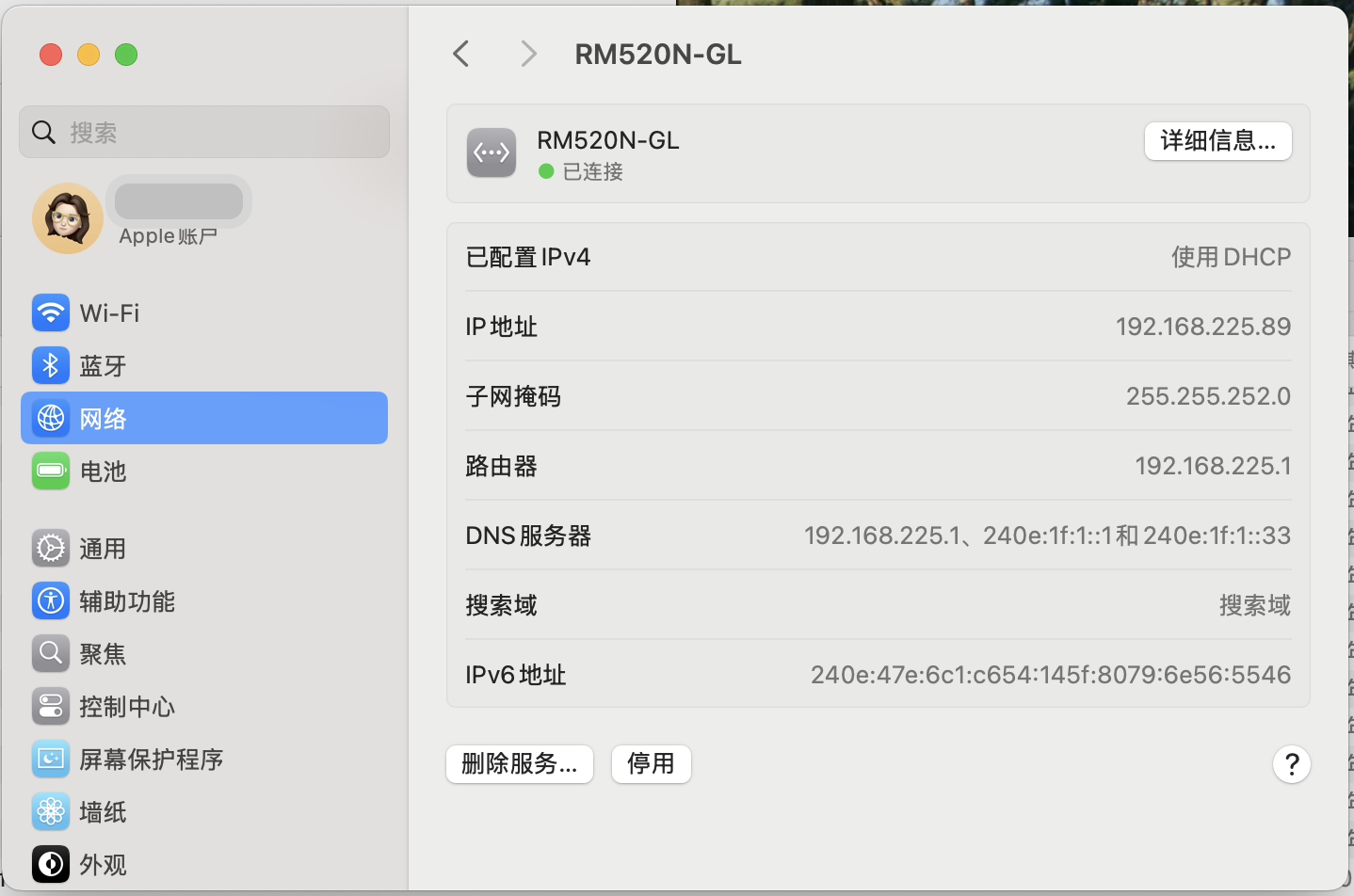
- Open System Settings → Network; an Ethernet service named
RM520N-GLappears - Set the configuration to Using DHCP; the status turns "Connected" when successful
It normally receives 192.168.225.x/22 (the module itself is 192.168.225.1).
Verify in a terminal:
networksetup -listallhardwareports | grep -A 2 RM520N
ifconfig en10        # actual interface name may differ
ping -c 3 192.168.225.1
The
enXname is assigned by macOS; look it up withnetworksetuporifconfigrather than assuming.
3. Can I change the APN or send AT commands on Mac?
No. macOS has no serial driver, and the Dongle's AT port does not show up under /dev/tty.usb*.
To change the APN, switch modes or check signal, go back to Linux or Windows.
4. FAQ
| Symptom | Cause / Resolution |
|---|---|
No RM520N-GL in Network | The module is not in ECM mode; switch to usbnet=1 and run AT+CFUN=1,1 |
| Adapter exists but no IP | ping 192.168.225.1 first; if it fails, the mode or driver is wrong — replug or switch mode again |
| Adapter connected but web pages do not load | SIM not registered or wrong APN; go back to Linux and check AT+CSQ, AT+CEREG? |
Dongle disappears after changing usbnet | Mode mismatch; plug it back into Linux and restore 1 via /dev/ttyUSB2 |