Application Test - Yolov5

Deploy
RK's officialrknn_model_zooyolov5once by yourself
Compiled Files and Model
RV1126 / Quick Start / Resource Download / 02.软件资料 / RV1126_RV1126B-p_YoloV5_Test.zip
https://wiki.fanconn.com/api_file/RV1126/02.软件资料/RV1126_RV1126B-p_YoloV5_Test.zip
1. Prepare the Build Environment
1.0 SDK Download
- 📁 RV1126BP SDK
LinuxV1.1.0updated versionV1.2.1
The new version V1.2.1 only provides new code reference; the corresponding functionality has not been developed.
Link: https://pan.baidu.com/s/1Br7GJm_1y5o274LQgSFmJw?pwd=fanc
Extraction code: fanc
1.1 Computer Hardware Configuration
Reference hardware configuration for the Ubuntu development environment computer:
| Hardware | Info |
|---|---|
| CPU | 64-bit 4-core ⬆️ |
| System | Ubuntu Server 24.04.3 LTS | |
| Memory | 8GB ⬆️ |
| Storage | 64GB ⬆️ free |
| User | Normal user, |
1.2 Computer Software Configuration
| Item | Configuration |
|---|---|
| OS Used | Ubuntu Server 24.04.3 LTS |
| Board Chip | CAM126B-P |
| SDK | rv1126b_linux6.1_sdk_v1.1.0.tar.gz (already includes the prebuilts directory) |
| Cross-compilation Environment | rv1126b_linux6.1_sdk_v1.1.0_prebuilts.zip prebuilts separately |
sudo apt update
sudo apt install git unzip vim
sudo apt install -y git cmake build-essential

## Ubuntu 24 server (minimized) is missing this
sudo apt update
sudo apt install -y libgl1
sudo apt install -y libsm6 libxext6 libxrender1
sudo apt install -y libglib2.0-0 libgomp1
1.3 Install Python 3.8
It is recommended to use the PPA (Personal Package Archives) repository to install:
-
Add the PPA repository:
sudo add-apt-repository ppa:deadsnakes/ppaPress
Enterto continue -
Update the package list:
sudo apt update -
Install Python 3.8:
sudo apt install python3.8
sudo apt install python3.8-venv
sudo apt install python3.8-dev build-essential -
Verify the installation:
python3.8 --versionShowing
Python 3.8.xindicates a successful installation
1.3 Create a Virtual Environment
# Create virtual environment venv_1126b
python3.8 -m venv venv_1126b
source venv_1126b/bin/activate

## Upgrade pip in the virtual environment
pip install --upgrade pip
2. Prepare the Software Environment
2.0 Activate the Virtual Environment Before Operating
- Activate the virtual environment:
cd ~
source venv_1126b/bin/activate
2.1 Prepare the Environment Conversion Software
-
Install rknn-toolkit2 in the environment:
git clone https://github.com/airockchip/rknn-toolkit2.git
cd ~/rknn-toolkit2/rknn-toolkit2

# Uninstall a possible old environment
# pip uninstall protobuf onnx

# Install rknn_toolkit2 | using tsinghua is faster
pip install -r packages/x86_64/requirements_cp38-2.3.2.txt -i https://pypi.tuna.tsinghua.edu.cn/simple
pip install packages/x86_64/rknn_toolkit2-2.3.2-cp38-cp38-manylinux_2_17_x86_64.manylinux2014_x86_64.whl -
Prepare the rknn_model_zoo environment
cd ~
git clone https://github.com/airockchip/rknn_model_zoo.git
3. Convert the Model
3.1 Obtain and Convert the Model
-
Download the model:
cd ~/rknn_model_zoo/examples/yolov5/model/
wget https://ftrg.zbox.filez.com/v2/delivery/data/95f00b0fc900458ba134f8b180b3f7a1/examples/yolov5/yolov5n.onnx -
Convert the model:
cd ~/rknn_model_zoo/examples/yolov5/python/
python3 convert.py ../model/yolov5n.onnx rv1126b u8 ../model/yolov5n_rv1126b.rknn
Model download:
The list of example models provided by rknn_model_zoo can be found in the readme on the homepage: https://github.com/airockchip/rknn_model_zoo
Current test model yolov5n: https://ftrg.zbox.filez.com/v2/delivery/data/95f00b0fc900458ba134f8b180b3f7a1/examples/yolov5/yolov5n.onnx
3.2 Conversion Result
Conversion process:
(venv_1126b) roy@Debian-i7-7700:~/rknn_model_zoo/examples/yolov5/python$ python3 convert.py ../model/yolov5n.onnx rv1126b u8 ../model/yolov5n_rv1126b.rknn

I rknn-toolkit2 version: 2.3.2
--> Config model
done
--> Loading model
I Loading : 100%|██████████████████████████████████████████████| 121/121 [00:00<00:00, 47493.05it/s]
done
--> Building model
I OpFusing 0: 100%|█████████████████████████████████████████████| 100/100 [00:00<00:00, 1577.74it/s]
I OpFusing 1 : 100%|████████████████████████████████████████████| 100/100 [00:00<00:00, 1164.83it/s]
I OpFusing 2 : 100%|█████████████████████████████████████████████| 100/100 [00:00<00:00, 279.81it/s]
W build: found outlier value, this may affect quantization accuracy
                        const name          abs_mean    abs_std     outlier value
                        onnx::Conv_347      0.68        0.89        -11.603
I GraphPreparing : 100%|████████████████████████████████████████| 149/149 [00:00<00:00, 9141.53it/s]
I Quantizating : 100%|████████████████████████████████████████████| 149/149 [00:04<00:00, 34.59it/s]
W build: The default input dtype of 'images' is changed from 'float32' to 'int8' in rknn model for performance!
                       Please take care of this change when deploy rknn model with Runtime API!
W build: The default output dtype of 'output0' is changed from 'float32' to 'int8' in rknn model for performance!
                      Please take care of this change when deploy rknn model with Runtime API!
W build: The default output dtype of '343' is changed from 'float32' to 'int8' in rknn model for performance!
                      Please take care of this change when deploy rknn model with Runtime API!
W build: The default output dtype of '345' is changed from 'float32' to 'int8' in rknn model for performance!
                      Please take care of this change when deploy rknn model with Runtime API!
I rknn building ...
I rknn building done.
done
--> Export rknn model
done
(venv_1126b) roy@Debian-i7-7700:~/rknn_model_zoo/examples/yolov5/python$ ls ../model
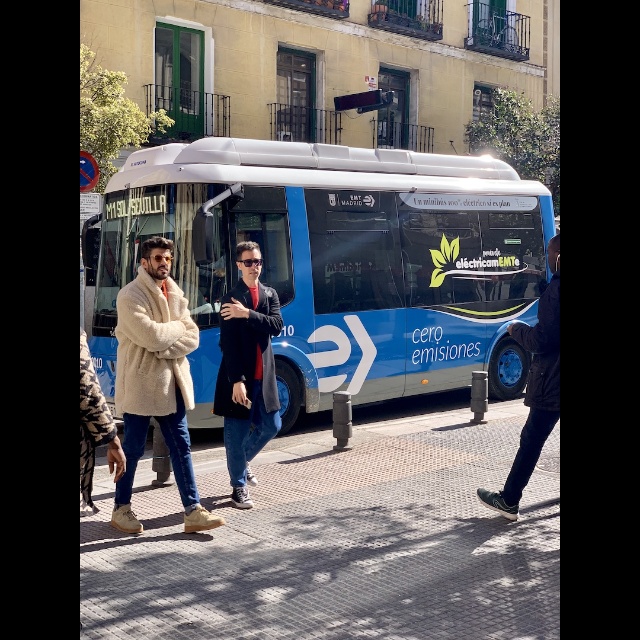
anchors_yolov5.txt  bus.jpg  coco_80_labels_list.txt  download_model.sh  yolov5n.onnx  yolov5n_rv1126b.rknn
The converted files are located at: ~/rknn_model_zoo/examples/yolov5/model/
Included files:
yolov5n.onnx- original ONNX modelyolov5n_rv1126b.rknn- converted RKNN modelanchors_yolov5.txt- anchor filecoco_80_labels_list.txt- label filebus.jpg- test imagedownload_model.sh- the example provides ayolov5s_relu.onnxthat you can try yourself
4. Cross-compile YOLOV5
4.0 Activate the Virtual Environment Before Operating
- Activate the virtual environment:
cd ~
source venv_1126b/bin/activate
4.1 Prepare the Cross-compilation Toolchain
If you have already downloaded the SDK
Just use the prebuilts directory directly
Download the cross-compilation toolchain:
The download address is in 1.2 Computer Software Configuration
-
Download and extract the cross-compilation environment:
cd ~
unzip rv1126b_linux6.1_sdk_v1.1.0_prebuilts.zip -
Obtain the cross-compilation tool path:
RV1126B is
aarch64; obtain the path of the corresponding environmentcd prebuilts/gcc/linux-x86/aarch64/gcc-arm-10.3-2021.07-x86_64-aarch64-none-linux-gnu
(venv_1126b) roy@Debian-i7-7700:~/prebuilts/gcc/linux-x86/aarch64/gcc-arm-10.3-2021.07-x86_64-aarch64-none-linux-gnu$ pwd
/home/roy/prebuilts/gcc/linux-x86/aarch64/gcc-arm-10.3-2021.07-x86_64-aarch64-none-linux-gnu
Output path: /home/roy/prebuilts/gcc/linux-x86/aarch64/gcc-arm-10.3-2021.07-x86_64-aarch64-none-linux-gnu
4.2 Cross-compile yolov5
-
Set environment variables:
export PATH=/home/roy/prebuilts/gcc/linux-x86/aarch64/gcc-arm-10.3-2021.07-x86_64-aarch64-none-linux-gnu/:$PATH
export GCC_COMPILER=/home/roy/prebuilts/gcc/linux-x86/aarch64/gcc-arm-10.3-2021.07-x86_64-aarch64-none-linux-gnu/bin/aarch64-none-linux-gnu -
Start compiling:
cd ~/rknn_model_zoo
chmod +x build-linux.sh
./build-linux.sh -t rv1126b -a aarch64 -d yolov5 -
Compilation output: The program is located at
~/rknn_model_zoo/install/rv1126b_linux_aarch64/rknn_yolov5_demo
4.3 Compilation Result
roy@Debian-i7-7700:~/rknn_model_zoo$ cd ~/rknn_model_zoo
chmod +x build-linux.sh
./build-linux.sh -t rv1126b -a aarch64 -d yolov5
./build-linux.sh -t rv1126b -a aarch64 -d yolov5
/home/roy/prebuilts/gcc/linux-x86/aarch64/gcc-arm-10.3-2021.07-x86_64-aarch64-none-linux-gnu/bin/aarch64-none-linux-gnu
===================================
BUILD_DEMO_NAME=yolov5
BUILD_DEMO_PATH=examples/yolov5/cpp
TARGET_SOC=rv1126b
TARGET_ARCH=aarch64
BUILD_TYPE=Release
ENABLE_ASAN=OFF
DISABLE_RGA=OFF
DISABLE_LIBJPEG=OFF
INSTALL_DIR=/home/roy/rknn_model_zoo/install/rv1126b_linux_aarch64/rknn_yolov5_demo
BUILD_DIR=/home/roy/rknn_model_zoo/build/build_rknn_yolov5_demo_rv1126b_linux_aarch64_Release
CC=/home/roy/prebuilts/gcc/linux-x86/aarch64/gcc-arm-10.3-2021.07-x86_64-aarch64-none-linux-gnu/bin/aarch64-none-linux-gnu-gcc
CXX=/home/roy/prebuilts/gcc/linux-x86/aarch64/gcc-arm-10.3-2021.07-x86_64-aarch64-none-linux-gnu/bin/aarch64-none-linux-gnu-g++
===================================
-- Configuring done (0.0s)
-- Generating done (0.0s)
-- Build files have been written to: /home/roy/rknn_model_zoo/build/build_rknn_yolov5_demo_rv1126b_linux_aarch64_Release
[ 50%] Built target fileutils
[ 50%] Built target imagedrawing
[ 50%] Built target imageutils
[ 66%] Built target audioutils
[100%] Built target rknn_yolov5_demo
[ 16%] Built target imageutils
[ 33%] Built target fileutils
[ 50%] Built target imagedrawing
[ 83%] Built target rknn_yolov5_demo
[100%] Built target audioutils
Install the project...
-- Install configuration: "Release"
-- Installing: /home/roy/rknn_model_zoo/install/rv1126b_linux_aarch64/rknn_yolov5_demo/./rknn_yolov5_demo
-- Set non-toolchain portion of runtime path of "/home/roy/rknn_model_zoo/install/rv1126b_linux_aarch64/rknn_yolov5_demo/./rknn_yolov5_demo" to "$ORIGIN/lib"
-- Installing: /home/roy/rknn_model_zoo/install/rv1126b_linux_aarch64/rknn_yolov5_demo/./model/bus.jpg
-- Installing: /home/roy/rknn_model_zoo/install/rv1126b_linux_aarch64/rknn_yolov5_demo/./model/coco_80_labels_list.txt
-- Installing: /home/roy/rknn_model_zoo/install/rv1126b_linux_aarch64/rknn_yolov5_demo/model/yolov5n_rv1126b.rknn
-- Installing: /home/roy/rknn_model_zoo/install/rv1126b_linux_aarch64/rknn_yolov5_demo/lib/librknnrt.so
-- Installing: /home/roy/rknn_model_zoo/install/rv1126b_linux_aarch64/rknn_yolov5_demo/lib/librga.so

roy@Debian-i7-7700:~/rknn_model_zoo$ ls /home/roy/rknn_model_zoo/install/rv1126b_linux_aarch64/rknn_yolov5_demo
lib  model  rknn_yolov5_demo
roy@Debian-i7-7700:~/rknn_model_zoo$ ls /home/roy/rknn_model_zoo/install/rv1126b_linux_aarch64/rknn_yolov5_demo/model/
bus.jpg  coco_80_labels_list.txt  yolov5n_rv1126b.rknn
5. Verify on the CAM126B-P Device
5.1 Deploy Files
-
Copy the model to the program directory:
Prepare a CAM126B-P board, and
flash the firmware and power it on -
Copy the model to the program directory:
If rknn_yolov5_demo does not have
yolov5n_rv1126b.rknn, you can manually copy one
cp ~/rknn_model_zoo/examples/yolov5/model/yolov5n_rv1126b.rknn ~/rknn_model_zoo/install/rv1126b_linux_aarch64/rknn_yolov5_demo/model/
-
Install ADB tools:
sudo apt install google-android-platform-tools-installer -
Connect the device and upload the program:
Wired connection: directly connect the USB data cable
roy@Debian-i7-7700:~$ adb devices
List of devices attached
fec3d3812d367ee	device

adb push ~/rknn_model_zoo/install/rv1126b_linux_aarch64/rknn_yolov5_demo/ /root/
Wireless connection: first obtain the device IP address, for example: 10.0.1.226
roy@Debian-i7-7700:~$ adb connect 10.0.1.226
connected to 10.0.1.226:5555
roy@Debian-i7-7700:~$ adb devices
List of devices attached
10.0.1.226:5555	device

adb push ~/rknn_model_zoo/install/rv1126b_linux_aarch64/rknn_yolov5_demo/ /root/
5.2 Execute Verification
- Enter the program directory:
First make sure the device is connected:
(venv_1126) roy@Debian-i7-7700:~$ adb devices
List of devices attached
10.0.1.226:5555	device

(venv_1126) roy@Debian-i7-7700:~$ adb shell
root@rv1126_rv1109:/#
root@rv1126bp-buildroot:~# ls
rknn_yolov5_demo
root@rv1126bp-buildroot:~# cd /root/rknn_yolov5_demo/
root@rv1126bp-buildroot:~/rknn_yolov5_demo# ls
lib               model             rknn_yolov5_demo
- Run the test program:
root@rv1126bp-buildroot:~/rknn_yolov5_demo# ./rknn_yolov5_demo ./model/yolov5n_rv1126b.rknn ./model/bus.jpg
5.3 Running Result
root@rv1126bp-buildroot:~/rknn_yolov5_demo# ./rknn_yolov5_demo ./model/yolov5n_rv1126b.rknn ./model/bus.jpg
load lable ./model/coco_80_labels_list.txt
model input num: 1, output num: 3
input tensors:
index=0, name=images, n_dims=4, dims=[1, 640, 640, 3], n_elems=1228800, size=1228800, fmt=NHWC, type=INT8, qnt_type=AFFINE, zp=-128, scale=0.003922
output tensors:
index=0, name=output0, n_dims=4, dims=[1, 255, 80, 80], n_elems=1632000, size=1632000, fmt=NCHW, type=INT8, qnt_type=AFFINE, zp=-128, scale=0.003917
index=1, name=343, n_dims=4, dims=[1, 255, 40, 40], n_elems=408000, size=408000, fmt=NCHW, type=INT8, qnt_type=AFFINE, zp=-128, scale=0.003922
index=2, name=345, n_dims=4, dims=[1, 255, 20, 20], n_elems=102000, size=102000, fmt=NCHW, type=INT8, qnt_type=AFFINE, zp=-128, scale=0.003922
model is NHWC input fmt
model input height=640, width=640, channel=3
origin size=640x640 crop size=640x640
input image: 640 x 640, subsampling: 4:2:0, colorspace: YCbCr, orientation: 1
scale=1.000000 dst_box=(0 0 639 639) allow_slight_change=1 _left_offset=0 _top_offset=0 padding_w=0 padding_h=0
rga_api version 1.10.1_[0]
46 im2d_rga_impl rga_get_info(718): Can not get the correct RGA version, please check the driver, version=4.1.34669

46 im2d_rga_impl rga_check(1280): rga im2d: rga2 get info failed!

Error on improcess STATUS=0
RGA error message: Fatal error: rga im2d: rga2 get info failed!

try convert image use cpu
finish
rknn_run
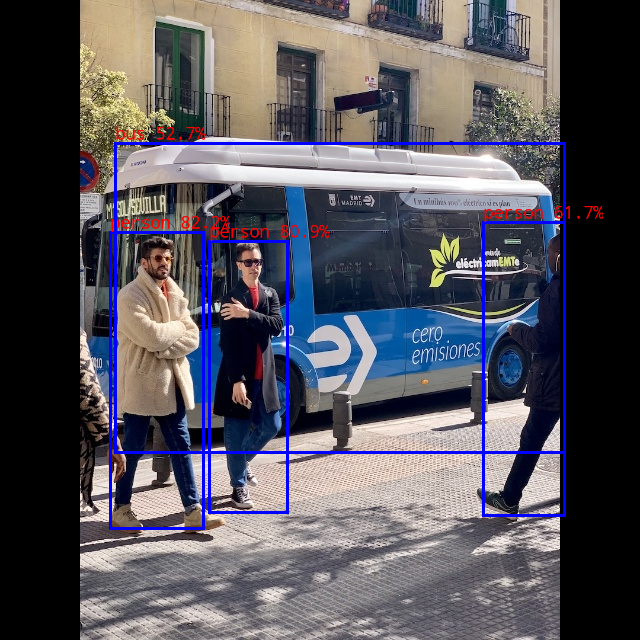
person @ (110 232 203 528) 0.822
person @ (209 241 287 512) 0.809
person @ (483 222 564 515) 0.617
bus @ (115 143 564 452) 0.527
write_image path: out.png width=640 height=640 channel=3 data=0x371d8ed0
root@rv1126bp-buildroot:~/rknn_yolov5_demo# ./rknn_yolov5_demo ./model/yolov5n_rv1126b.rknn ./model/bus.jpg
Final output: File information:
root@rv1126bp-buildroot:~/rknn_yolov5_demo# ls
lib               model             out.png           rknn_yolov5_demo
Effect image:
Summary
Through the above steps, we successfully completed:
- ✅ Set up the cross-compilation environment
- ✅ Convert the Yolov5 model to RKNN format
- ✅ Compile the RKNN Yolov5 demo program
- ✅ Deploy and verify on the CAM126B-P device
Notes
| Item | CAM126B-P | RV1126 | Description |
|---|---|---|---|
| RKNN Toolkit Version | rknn-toolkit2 v2.x | rknn-toolkit v1.7.5 | The two are incompatible and cannot be mixed |
| System Architecture | 64-bit ARM (aarch64) | 32-bit ARM (armhf) | Requires the corresponding cross-compilation toolchain |
| Build Options | -t rv1126b -a aarch64 | -t rv1126 -a armhf | Build script parameters are different |
| Deployment Method | Direct file deployment | Direct file deployment | Differences in how it runs |
| Model Conversion Warnings | May appear, usually does not affect use | May appear, usually does not affect use | Ignorable quantization accuracy warnings |
| Python Environment | Python 3.8 + virtual environment | Python 3.8 + virtual environment | Ensure environment consistency |