Firmware Usage - IPC Streaming

Buildroot IPC only. For other firmware, flash CAM126B-P Buildroot IPC before proceeding Buildroot IPC only. For other firmware, flash CAM126B-P Buildroot IPC before proceeding Buildroot IPC only. For other firmware, flash CAM126B-P Buildroot IPC before proceeding
Basic Usage
Account and Password
The default SSH credentials are:
- User:
root - Password:
rockchip
This is the Buildroot public configuration BR2_TARGET_GENERIC_ROOT_PASSWD="rockchip", and it matches the hash in /etc/shadow on the current board. On the board, dropbear is listening on port 22 and allows root login.
ssh root@10.0.0.102
# password rockchip
The web backend is a separate set of credentials, not the same as SSH.
- User:
admin - Password:
admin
Downloading the Firmware: Buildroot IPC
-
Updated to 1.1
-
Fanconn_V1.1.0_RV1126B_BUILDROOT_IPC_EMMC_V1.1_20251024.tar.gz
Link: https://pan.baidu.com/s/1nqTiy_hoq1D2N3hUAFHfHA?pwd=fanc Extraction code: fanc Copy this content and open the Baidu Netdisk mobile app for easier operation
Checking the IP Address via ADB
After the device
adb devices
List of devices attached
a56d31dfb177858c        device

adb shell
Checking the IP address inside the device: eth0 10.0.1.222
root@rv1126bp-buildroot:/# ip addr
1: lo: <LOOPBACK,UP,LOWER_UP> mtu 65536 qdisc noqueue qlen 1000
    link/loopback 00:00:00:00:00:00 brd 00:00:00:00:00:00
    inet 127.0.0.1/8 scope host lo
       valid_lft forever preferred_lft forever
2: eth0: <BROADCAST,MULTICAST,UP,LOWER_UP> mtu 1500 qdisc mq qlen 1000
    link/ether ae:0c:f9:b9:30:b6 brd ff:ff:ff:ff:ff:ff
    inet 10.0.1.222/22 brd 10.0.3.255 scope global dynamic eth0
       valid_lft 1715sec preferred_lft 1375sec
IPC Streaming Addresses
Note:
The IP is obtained dynamically
554 is the default port
High definition
rtsp://10.0.1.222:554/live/0
Low resolution
rtsp://10.0.1.222:554/live/1
Actual Streaming Result
Once you have the IP, you can access the stream directly
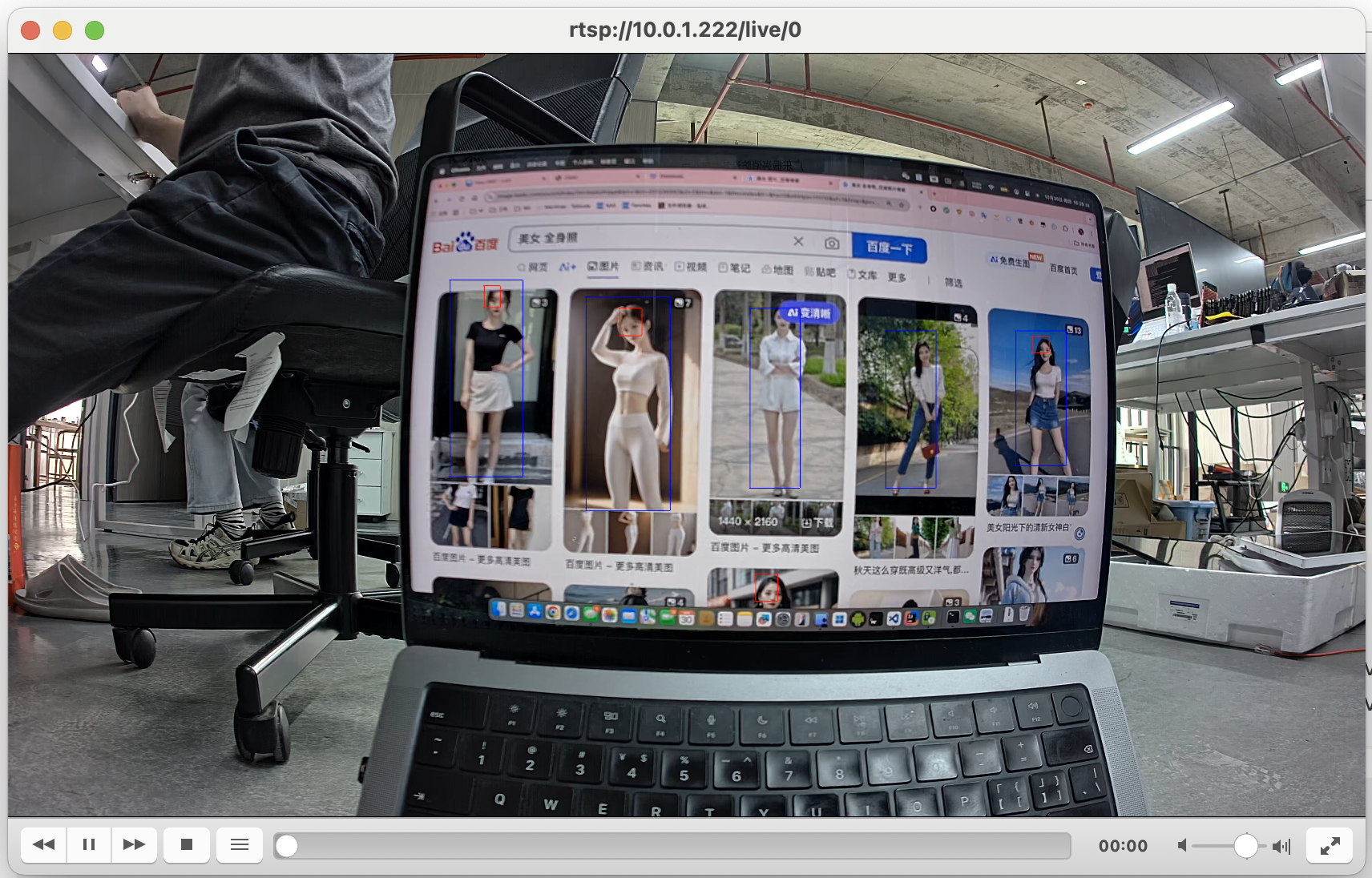
Streaming Configuration
Configuration File
The resolution and encoding format are all in this file on the board, /userdata/rkipc.ini taking precedence/oem/usr/share/rkipc*.ini.
ssh root@10.0.1.222
# password rockchip

vi /userdata/rkipc.ini
It can also be changed in the web backend, which uses a different set of accounts than SSH:
- Address:
http://10.0.1.222 - User:
admin - Password:
admin
Stream Mapping
| Address | Configuration section | Default resolution | Default encoding |
|---|---|---|---|
rtsp://10.0.1.222:554/live/0 | [video.0] main stream | 3840×2160 | H.265 |
rtsp://10.0.1.222:554/live/1 | [video.1] sub stream | 640×480 | H.265 |
rtmp://10.0.1.222:1935/live/substream | [video.1] the same sub stream | 640×480 | H.265 |
/live/1 and the RTMP substream are the same stream; changing [video.1] changes both.
Changing Resolution / H.264 / H.265
Change these two items in the corresponding section:
[video.0]
width              = 1920
height             = 1080
output_data_type   = H.264

[video.1]
width              = 640
height             = 480
output_data_type   = H.264
- Set
output_data_typetoH.264orH.265; both streams are supported - The resolution must not exceed the
max_width/max_heightof the same section, nor the actual capability of the camera - Common main stream values:
3840*21601920*10801280*720960*540640*360 - Common sub stream values:
1280*720640*480352*288
After changing, the streaming service must be restarted for it to take effect:
/etc/init.d/S99rkipc restart
Web Page Content
Disabling the Web Page Display
Log in to the device and run the following commands to use only simple_vi_bind_venc_rtsp
/etc/init.d/S99rkipc stop

simple_vi_bind_venc_rtsp
Troubleshooting Common Issues
Streaming Abnormalities
- Usually the camera is not inserted, or is not recognized correctly
After running adb shell, logcat | grep imx415 or logcat | grep imx307 to view the driver loading information of the corresponding imx series camera
If logcag is not available, use dmesg | grep imx415 or dmesg | grep imx307
If there is no loading information, it means there is no camera or it is not recognized properly. Reference information:
root@rv1126bp-buildroot:/# logcat | grep imx
...
Jan  1 00:00:01 rv1126bp-buildroot kern.info kernel: [    1.157751] imx307 1-001a: driver version: 00.01.06
Jan  1 00:00:01 rv1126bp-buildroot kern.info kernel: [    1.366783] imx415 1-0010: driver version: 00.01.08