Interface Debugging

Device Debugging
USB Debugging
Connecting the Device
Connect the debug device via USB. If the computer's USB port cannot supply enough power to start the device,
| Pin No. | Function | Default cable color |
|---|---|---|
| 1 | VCC5V0 | Red |
| 2 | OTG_DM | White |
| 3 | OTG_DP | Green/white |
| 4 | GND | Black |
USB interface
ADB Debugging
You can first download QtScrcpy or
- Download
QtScrcpy-win-x64-v3.3.3.zipand extract it
Extract QtScrcpy-win-x64
- Open it in cmd
Open the extracted QtScrcpy-win-x64 directory
Example: Running commands on the device via ADB
roy@HUAWEIMcMiniM4 ~ % adb devices
List of devices attached
fec3d3812d367ee	device

roy@HUAWEIMcMiniM4 ~ % adb shell

root@rv1126_rv1109:/# uname -a
Linux rv1126_rv1109 4.19.111 #1 SMP PREEMPT Thu Sep 5 12:31:38 UTC 2024 armv7l GNU/Linux
ETH Debugging
Checking the IP
You can check the IP address through the debug serial port, adb, or ssh, for example:
For how to enter ADB, refer to Example: Running commands on the device via adb
roy@HUAWEIMcMiniM4 ~ % adb shell

root@rv1126_rv1109:/# ip addr
1: lo: <LOOPBACK,UP,LOWER_UP> mtu 65536 qdisc noqueue qlen 1000
    link/loopback 00:00:00:00:00:00 brd 00:00:00:00:00:00
    inet 127.0.0.1/8 scope host lo
       valid_lft forever preferred_lft forever
2: eth0: <BROADCAST,MULTICAST,UP,LOWER_UP> mtu 1500 qdisc mq qlen 1000
    link/ether 62:c6:19:eb:91:a5 brd ff:ff:ff:ff:ff:ff
    inet 10.0.0.254/24 brd 10.0.0.255 scope global eth0
       valid_lft forever preferred_lft forever
Wiring method
Changing the IP
Different cameras initialize different configuration files:
- For the
imx307 camera you can customize the configuration:
vi /oem/usr/share/rkipc-imx307.ini
...
[network.eth]
enable = 1
interface_num=1
ndevice_name=eth0
method=static
device_ip=10.0.0.254
subnetMask=255.255.255.0
gateway=10.0.0.1
DNS1=10.0.0.1
DNS2=114.114.114.114
- For the
imx415 camera you can customize the configuration:
vi /oem/usr/share/rkipc-imx415.ini
...
[network.eth]
enable = 1
interface_num=1
ndevice_name=eth0
method=static
device_ip=10.0.0.254
subnetMask=255.255.255.0
gateway=10.0.0.1
DNS1=10.0.0.1
DNS2=114.114.114.114
- If
no camera is present , or thecamera is disabled , you can customize the configuration
vi /oem/usr/share/rkipc-common.ini
...
[network.eth]
enable = 1
interface_num=1
ndevice_name=eth0
method=static
device_ip=10.0.0.254
subnetMask=255.255.255.0
gateway=10.0.0.1
DNS1=10.0.0.1
DNS2=114.114.114.114
and also modify vi /etc/init.d/S98_lunch_init to cancel the camera initialization
source /etc/profile.d/RkEnv.sh

case "$1" in
	start)
		### Comment out here
		# [ -f /oem/usr/bin/RkLunch.sh ] && source /oem/usr/bin/RkLunch.sh
		# #recovery test
		# if [ -e "/oem/rockchip_test/auto_reboot.sh" ]; then
		# 	mkdir /data/cfg/rockchip_test
		# 	cp /oem/rockchip_test/auto_reboot.sh /data/cfg/rockchip_test
		# 	source /data/cfg/rockchip_test/auto_reboot.sh &
		# fi
		### Comment out here

		### Add here
		chmod +x /oem/usr/share/rkipc-common.sh
		source /oem/usr/share/rkipc-common.sh
		### Add here
		;;
	stop)
		[ -f /oem/usr/bin/RkLunch-stop.sh ] && source /oem/usr/bin/RkLunch-stop.sh
		printf "stop finished\n"
		;;
	*)
		echo "Usage: $0 {start|stop}"
		exit 1
		;;
esac
exit 0
MIPI Debugging
-
40PIN dual MIPI/LVDS input interface (supports 4lane)
-
See the datasheet for the interface definition
-
Default bundle:
IMX415orIMX307optional
Wiring method
Appendix: 40pin MIPI interface information:
40 PIN 0.5MM FPC connector, model: X05C2040TZ
You can check the sensor status log with the dmesg or logcat command to make sure the sensor is loaded properly; otherwise check the connection or try replacing the camera.
# If the senser is imx307
dmesg | grep imx307

# If the senser is imx415
dmesg | grep imx415
# If the senser is imx307
logcat | grep imx307

# If the senser is imx415
logcat | grep imx415
Reference log for rv1126bp with no camera connected:
root@rv1126bp-buildroot:/# logcat | grep imx415
Jan  1 00:00:01 rv1126bp-buildroot kern.info kernel: [    0.871121] /i2c@21110000/imx415@10: Fixed dependency cycle(s) with /csi2-dphy0
Jan  1 00:00:01 rv1126bp-buildroot kern.info kernel: [    1.344418] imx415 1-0010: driver version: 00.01.08
Jan  1 00:00:01 rv1126bp-buildroot kern.warn kernel: [    1.344450] imx415 1-0010: Get hdr mode failed! no hdr default
Jan  1 00:00:01 rv1126bp-buildroot kern.info kernel: [    1.344484] imx415 1-0010: detect imx415 lane 4
Jan  1 00:00:01 rv1126bp-buildroot kern.warn kernel: [    1.344597] imx415 1-0010: Failed to get power-gpios
Jan  1 00:00:01 rv1126bp-buildroot kern.info kernel: [    1.344617] imx415 1-0010: could not get default pinstate
Jan  1 00:00:01 rv1126bp-buildroot kern.info kernel: [    1.344631] imx415 1-0010: could not get sleep pinstate
Jan  1 00:00:01 rv1126bp-buildroot kern.warn kernel: [    1.344668] imx415 1-0010: supply dvdd not found, using dummy regulator
Jan  1 00:00:01 rv1126bp-buildroot kern.warn kernel: [    1.344850] imx415 1-0010: supply dovdd not found, using dummy regulator
Jan  1 00:00:01 rv1126bp-buildroot kern.warn kernel: [    1.344922] imx415 1-0010: supply avdd not found, using dummy regulator
Jan  1 00:00:01 rv1126bp-buildroot kern.err kernel: [    1.511281] imx415 1-0010: Unexpected sensor id(000000), ret(-5)
UART Debugging
The new firmware interface is ttyS2 and the default baud rate is 9600
Link: https://pan.baidu.com/s/1NyfRuSKcakxMJCZohiFl6A?pwd=fanc Extraction code: fanc Copy this content and open the Baidu Netdisk mobile app for easier operation
| Pin No. | Function | Description | Pin No. | Function | Description |
|---|---|---|---|---|---|
| 1 | GND | 13 | BT_WAKE_HOST | ||
| 2 | GND | 14 | WIFI_REG_ON | ||
| 3 | VCC5V0 | 15 | SDIO_D0 | ||
| 4 | VCC5V0 | 16 | SDIO_D1 | ||
| 5 | USB_HOST_DP | 1-6 can be used as one USB Host | 17 | SDIO_D2 | |
| 6 | USB_HOST_DM | 1-6 can be used as one USB Host | 18 | SDIO_D3 | |
| 7 | GND | 19 | SDIO_CMD | ||
| 8 | ADKEY_IN0 | 20 | SDIO_CLK | ||
| 9 | GND | 21 | UART0_RTSN | ||
| 10 | WIFI_WAKE_HOST | 22 | UART0_TX | TTL 1V8; tested and works for 3V3 TX/RX | |
| 11 | BT_RST | 23 | UART0_RX | TTL 1V8; tested and works for 3V3 TX/RX | |
| 12 | BT_WAKE | 24 | UART0_CTSN |
The USB-TTL adapter shown in the figure must be purchased and configured by yourself.
The 24 PIN 0.5MM FPC debug board/cable needs to be purchased separately
Wiring method
Appendix: 24pin expansion interface information:
24 PIN 0.5MM FPC connector, model: X05C2024TZ
On the CAM126 side, check the baud rate and other information
root@rv1126_rv1109:/# stty -F /dev/ttyS0 -a | grep speed
speed 9600 baud; rows 0; columns 0; line = 0;
On the PC side (USB-TTL), check the baud rate and other information
root@Ubuntu-Magicmini-i5-8500B:~$ stty -F /dev/ttyUSB0 -a | grep speed
speed 9600 baud; rows 0; columns 0; line = 0;
Test method:
## Check on the PC first
cat /dev/ttyUSB0
TX_Test

## Then send from CAM126
echo "TX_Test" > /dev/ttyS0
Test result
RS-485 Debugging
The RS-485 interface is ttyS3 and the default baud rate is 9600
| Pin No. | Function |
|---|---|
| 1 | GND |
| 2 | A |
| 3 | B |
The USB-RS485 adapter shown in the figure must be purchased and configured by yourself.
Wiring method
On the CAM126 side, check the baud rate and other information
root@rv1126_rv1109:/# stty -F /dev/ttyS3 -a | grep speed
speed 9600 baud; rows 0; columns 0; line = 0;
On the PC side (USB-TTL), check the baud rate and other information
root@Ubuntu-Magicmini-i5-8500B:~$ stty -F /dev/ttyUSB0 -a | grep speed
speed 9600 baud; rows 0; columns 0; line = 0;
Test method:
## Check on the PC first
cat /dev/ttyUSB0
TX_Test

## Then send from CAM126
echo "TX_Test" > /dev/ttyS3
Test result
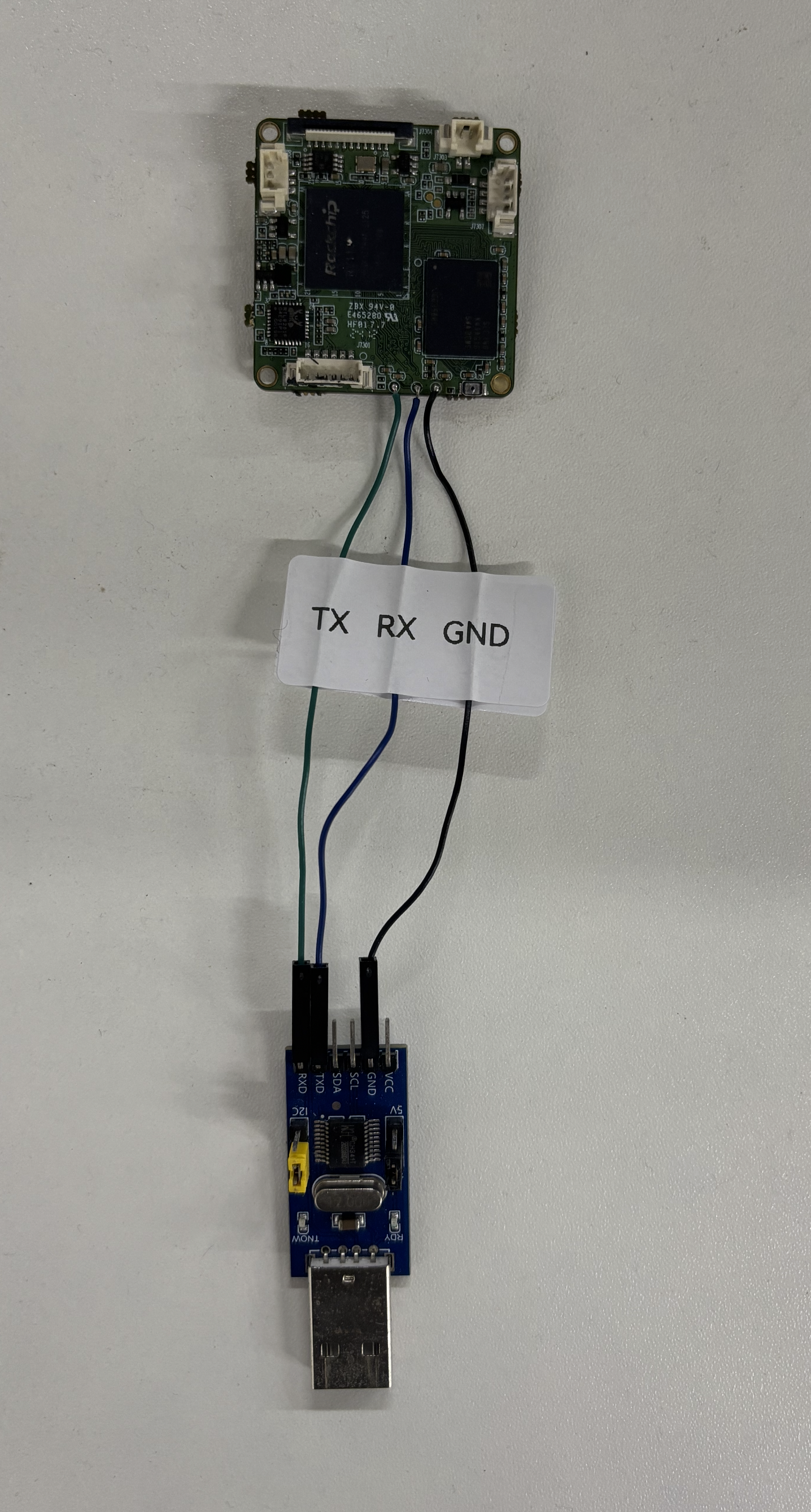
Debug Console
Please use TTL debug 1500000 (five 0s 0️⃣)
Reference usage of Linux screen:
screen /dev/ttyUSB0 1500000
To exit:
Ctrl+A : quit
Powering on will show logs like:
Bootdev(atags): mmc 0
MMC0: HS200, 200Mhz
PartType 0xfde00000 as drm logo base memory
Model: Rockchip RV1126B-P E 0N/A)
  gpll 1188000 KHz
  aupll 786431 KHz
t 100000 KHz
  aclk_top_root 600000 KHz
  pclk_top_root 100000h0: ethernet@21c70000
Hit key to stop autoboot('CTRL+C'): 0
The USB-TTL adapter shown in the figure must be purchased and configured by yourself.
The debug pads need to be soldered by yourself.
Common Linux Commands
Checking the Core Temperature
cat /sys/class/thermal/thermal_zone0/temp
cat /sys/class/thermal/thermal_zone1/temp

45200
Divide the output by 100 to get the temperature in Celsius. The NPU and CPU are together and can be treated as the same.
Software Debugging
RKISP_Tuner_v3 Software
File shared via Netdisk: RKISP_Tuner_v3.4.1_Alpha.rar
Link: https://pan.baidu.com/s/1V3cGpbYyG0I3mIcRWOqHzQ?pwd=fanc Extraction code: fanc Copy this content and open the Baidu Netdisk mobile app for easier operation