SDK Related - Compiling Firmware

1. 📁 RV1126 SDK File Download
CAM126 / CAM126B-P: pay attention to the distinction
Go to CAM126 SDK | Go to CAM126B-P SDK
Link: https://pan.baidu.com/s/1OSdhBi32C13lBNVC-Sz63w?pwd=fanc
Extraction code: fanc
2. Extract Files
The downloaded SDK files are as follows
roy@13500h:~/rv1126$ ls
rv1126-repo-v20230717-dev.tar.gz00  rv1126-repo-v20230717-dev.tar.gz01
rv1126-repo-v20230717-dev.tar.gz02
Merge multiple split files and extract
cat rv1126-repo-v20230717-dev.tar.gz* > rv1126-repo-v20230717-dev.tar.gz

tar -zxvf rv1126-repo-v20230717-dev.tar.gz
Move to the build directory
mv rv1126-repo-v20230717-dev ~/

cd ~/rv1126-repo-v20230717-dev
After extraction, you may first read the official RK instructions
The document is located at
rv1126-repo-v20230717-dev/docs/Rockchip_Developer_Guide_Linux_Software_CN.pdf
3. Prepare the Environment
The installation commands for the software packages that the SDK build environment depends on are as follows:
sudo apt-get install git ssh make gcc libssl-dev liblz4-tool expect \
g++ patchelf chrpath gawk texinfo chrpath diffstat binfmt-support \
qemu-user-static live-build bison flex fakeroot cmake gcc-multilib \
g++-multilib unzip device-tree-compiler ncurses-dev libgucharmap-2-90-dev \
bzip2 expat gpgv2 cpp-aarch64-linux-gnu time mtd-utils
Python dependency packages:
sudo pip3 install asciidoc
Add one command that may be needed:
If
Ubuntu 22sayspythonis not available, you can linkpythone3to itroot@13500h:~$ python
-bash: python: command not found
sudo ln -s /usr/bin/python3 /usr/bin/python
4. First Build
4.1 The first compilation requires a full build
Configure first
./build.sh lunch
-
Remember to select
2.rockchip 38x38 emmc defconfig -
Enter
2and press Enter
Start the full build
./build.sh
4.2 Compile uboot separately
./build.sh uboot
4.3 Compile kernel separately
./build.sh kernel
4.4 Compile rootfs separately
./build.sh rootfs
4.5 Build Directory
The final built files are located in ~/rv1126-repo-v20230717-dev/rockdev
FAQ
SDK Notes
This is RK's official SDK; we only performed basic BSP adaptation and image effects.
For specific functional aspects, you can implement them based on the open-source code. We do not provide customization work in this direction.
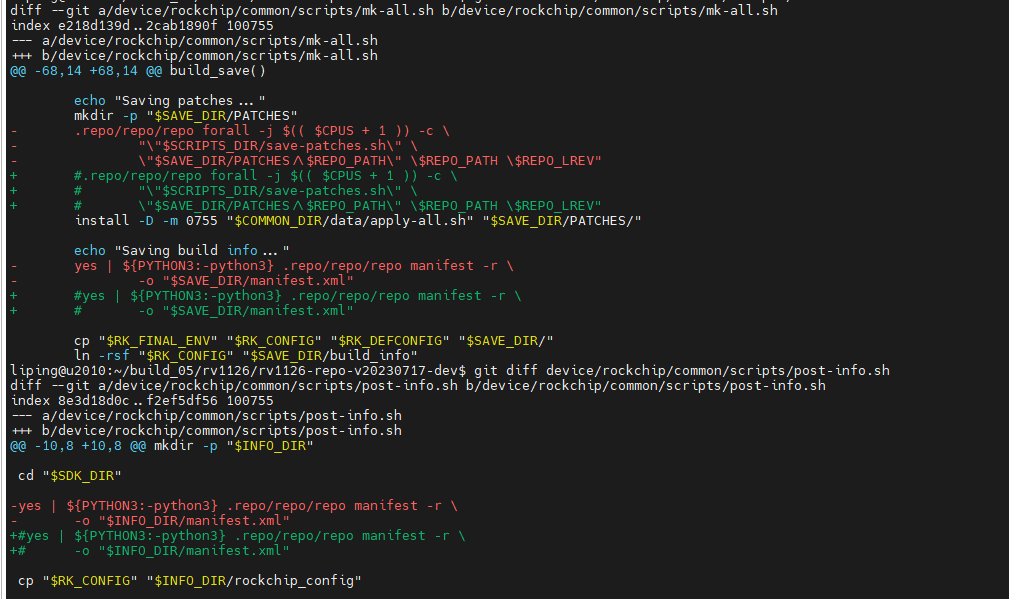
repo compile error
Find the file that reports the error and comment out repo
device/rockchip/common/scripts/mk-all.sh
device/rockchip/common/scripts/post-info.sh
Using Uart0 requires modifying the device tree and recompiling the kernel
Already compiled version
Files shared via network disk:
Link: https://pan.baidu.com/s/1NyfRuSKcakxMJCZohiFl6A?pwd=fanc Extraction code: fanc Copy this content and open the Baidu Network Disk mobile app for more convenient operation
--Shared by Baidu Network Disk Super Member v6
Place it in
Compile the kernel yourself
-
Modify the device tree
kernel/scripts/dtc/include-prefixes/arm/rv1126-38x38-v10-emmc.dts-
Change
statusingpio_i2ctodisabled -
Add a new node
uart0withstatus = "okay"
-
	gpio_i2c: gpio_i2c {
		status = "disabled";
		compatible = "i2c-gpio";
		scl-gpios = <&gpio1 RK_PC2 GPIO_ACTIVE_HIGH>;
		sda-gpios = <&gpio1 RK_PC3 GPIO_ACTIVE_HIGH>;
		i2c-gpio,delay-us = <2>;	/* ~100 kHz */
		#address-cells = <1>;
		#size-cells = <0>;
	};
	&uart0 {
		status = "okay";
	};
Configure RNDIS
vim device/rockchip/common/images/oem/oem_uvcc/usb_config.sh
pre_run_rndis()
{
  # RNDIS reference:
  # 1) Use DEFAULT_RNDIS_IP by default.
  # 2) If /data/uvc_xu_ip_save exists, the first line overrides it.
  DEFAULT_RNDIS_IP="192.168.77.1"
  DEFAULT_RNDIS_MASK="255.255.255.0"
  IP_FILE=/data/uvc_xu_ip_save

  if echo "$1" | grep -q "rndis"; then
    RNDIS_IP="$DEFAULT_RNDIS_IP"
    echo "config usb0 IP..."

    if [ -f "$IP_FILE" ]; then
      SAVED_IP="$(sed -n '1p' "$IP_FILE")"
      if [ -n "$SAVED_IP" ]; then
        RNDIS_IP="$SAVED_IP"
      fi
      echo "saved ip is: $RNDIS_IP"
    fi

    ifconfig usb0 "$RNDIS_IP" netmask "$DEFAULT_RNDIS_MASK"
    ifconfig usb0 up
  fi
}
A reference rndis version has already been modified; the file is:
device/rockchip/common/images/oem/oem_uvcc/usb_config.sh
What was changed is pre_run_rndis(), and the current behavior is:
- By default, configure
usb0with192.168.77.1/24 - If
/data/uvc_xu_ip_saveexists, read the first line as the overriding IP - Finally uniformly run
ifconfig usb0 up
You can try it directly:
/oem/usb_config.sh rndis
If you want to change it to your own network segment, just change these two variables:
DEFAULT_RNDIS_IP="192.168.77.1"DEFAULT_RNDIS_MASK="255.255.255.0"
If you want "a completely fixed IP that does not allow file override", I can also change it to a pure fixed version for you.
Compile Debian command
You need to configure the variable; everything else stays the same
export RK_ROOTFS_SYSTEM=debian